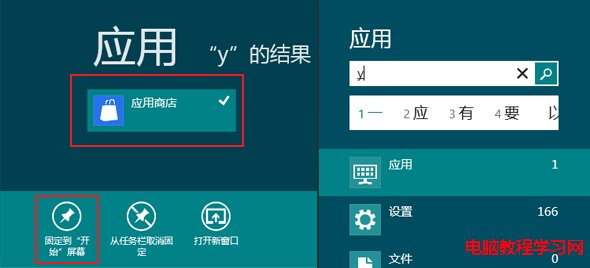
Windows 8 消費者預覽版常因相容性問題或優化軟體誤刪,導致應用程式商店磚從 Metro 開始畫面消失。找回方法:按 Win+Q 開啟應用程式搜尋 → 輸入「應用程式商店」 → 右鍵點選搜尋結果 → 「釘選到『開始』畫面」,商店磚即刻恢復。
Win7 設定小米路由器並連接手機完整圖文教學
Aero Glass 10240 毛玻璃工具下載 讓 Win10 RTM 找回透明視覺
Windows Server 2008 IIS 7 驗證碼無法顯示?啟用 ASP「啟用父路徑」即可解決
Win7 螢幕截圖四大法:PrintScreen 全螢幕、Alt+PrintScreen 視窗、截圖工具、Ctrl+PrintScreen
Win8 系統聲音異常如何還原預設聲音方案
解決 Win10 預覽版 Windows Defender 無法啟動的完整指南
Windows 8.1 卸載 KB3000850 更新補丁教學:解決遊戲相容性問題
兩種禁止 Win 10 後台程式運行的方法:隱私設定與工作管理員