Win8.1 滑鼠間歇性停滯,可能為驅動損壞或系統設定問題。兩種模式切換排查:
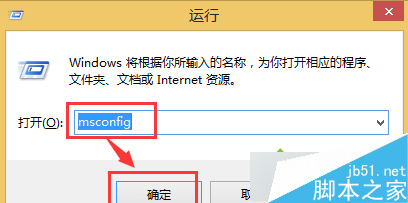
msconfig
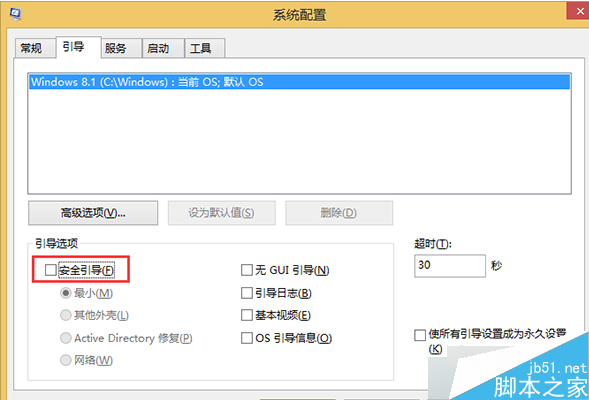
文章附系統設定視窗截圖,安全模式下若滑鼠正常則為驅動或第三方軟體衝突,可進一步更新驅動或移除衝突程式。
Win10 Build 10041 下載地址:官方 ISO 鏡像與快速通道更新獲取指南
Windows Server 2008 硬碟加密全指令流程:DiskPart 建立 GPT 分割區 + NTFS 格式化
Win7 建立系統映像備份完整教學:控制台備份與還原、選擇儲存位置、建立修復光碟
Win10 開啟/關閉飛行模式三種方法:操作中心、設置、硬件開關
Win10 解除 Microsoft 帳戶綁定:切換回本機帳戶保護隱私、停用雲端同步
Win8.1 寬帶撥號自動連線設定教學:任務排程器實現開機自動上網
Win10 引入雙因素驗證:手機/PIN/生物識別作為第二重認證,防盜帳號資料外洩
分區助手 — 固態硬碟安裝系統必備神器:無損 4K 對齊、遷移 OS、分區管理