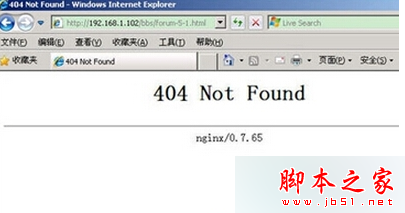
IE 顯示 404 Not Found 錯誤頁面。
使用者輸入的網址錯誤、或目標頁面已移除/遷移,IIS 回傳 404 狀態碼表示資源不存在。
單純用戶端問題,修正網址即可解決;非本機系統故障。
XP 資源管理員搜尋欄變灰?rundll32 重新註冊 shell32.dll
Intel RealSense 3D 攝像頭驅動 1.4.27 釋出:強化 Windows Hello 臉部辨識戶外表現
Windows 10 生物識別新功能 Windows Hello 詳解:指紋/臉部/虹膜解鎖,企業級安全體驗
Win10 14342 週年更新預覽版藍屏?罪魁禍首是 Symantec/Norton,完整移除教學
WinXP QQ 視訊畫面全黑?啟用/更新 USB 視訊裝置驅動修復
Win10 主題背景變黑色?切換預設主題再切回即可修復
Win10 Build 10125 新特性演示視頻:平板模式後退鍵、固定內容到開始菜單、圖標美化
Win7 IE 停用分頁瀏覽模式:還原單一視窗單一網頁傳統操作