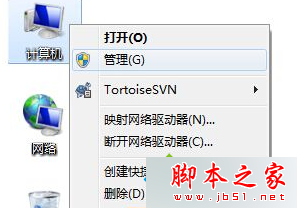
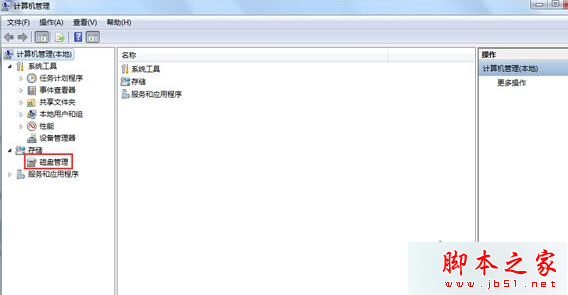
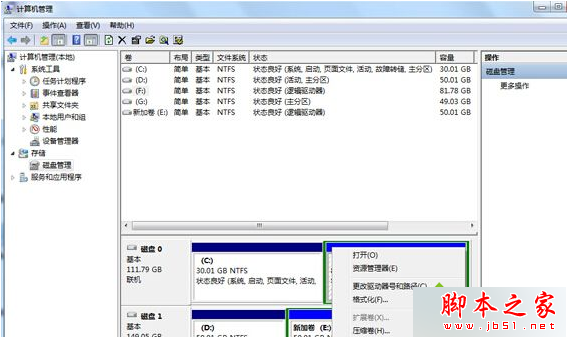
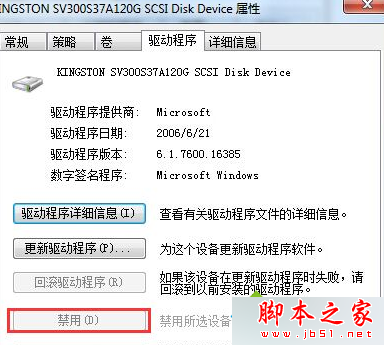
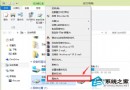
此為無媒體插入的讀卡機/虛擬光碟機導致關機掛住,停用該裝置驅動程式即可恢復正常關機。
Win10 10547 專業版也能用 Windows 聚焦鎖屏
Win7 光碟機插入光碟仍提示「請插入光碟」修復教學
Win10 Build 10568 更新了什麼?版本號微增、介面無變化、專注修補與效能提升
Win10 專業版終於支援 Windows Spotlight 聚焦鎖屏:Build 10547 開啟方法
Windows 7 如何測試聲卡有無聲音?喇叭圖示→播放裝置→設定→測試,無聲則檢查屬性/等級/增強
網友抱怨:Win10 Mobile 應用商店假冒應用氾濫 官方審核機制待加強
Windows 8 切換至 Administrator 超級管理員帳戶教學:電腦管理啟用內建帳戶
Win10 Edge 瀏覽器為何無法透過應用程式商店更新?核心 API 綁定系統級更新機制