Windows XP Windows 7 Windows 2003 Windows Vista Windows 綜合教學 Linux 系統教學
Windows 10 Windows 8 Windows 2008 Windows NT Windows Server 電腦軟體教學
您现在的位置: Windows教程網 >> Windows教程 >  >> Windows 綜合教學 >> 關於 Windows

Win7 無法安全移除 USB 裝置提示「Windows 無法停止」?四大解決方案

編輯:關於 Windows

現象

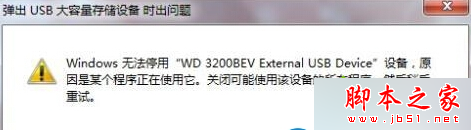
移除 USB 隨身碟/行動硬碟時彈出「Windows 無法停止 'WD3200BEV External USB Device' 裝置」。
成因

有程式正在存取該裝置,需關閉相關程式後重試。

解法

  1. 右鍵工作列右下角 USB 圖示 → 選擇該裝置嘗試弹出。
  2. 若仍失敗,稍等片刻(資料寫入緩衝區需時間)再試。
  3. 使用第三方工具(如 USB Safely Remove)強制弹出。
  4. 註銷目前使用者 → 登出後安全移除 → 再登入,最有效且無需額外軟體。

註銷使用者可釋放所有檔案控制代碼,確保裝置無程式佔用,隨後安全移除即可成功。

Copyright © Windows教程網 All Rights Reserved