Windows XP Windows 7 Windows 2003 Windows Vista Windows 綜合教學 Linux 系統教學
Windows 10 Windows 8 Windows 2008 Windows NT Windows Server 電腦軟體教學
您现在的位置: Windows教程網 >> Windows教程 >  >> Windows 綜合教學 >> 關於 Windows

重裝 Win7 開機報錯「Inconsistent filesystem」無法啟動?MBR 修復教學

編輯:關於 Windows

安裝 Win7 後開機出現 Error 16: Inconsistent filesystem structure,導致無法進入系統。這通常發生在使用 Ghost 版安裝映像時,Grub 無法辨識 /boot 分區或根分區所致。
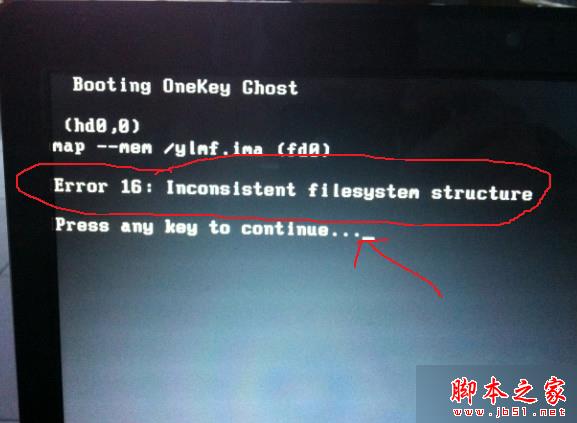
故障成因

「Inconsistent filesystem structure」意指檔案系統結構不一致,常見於 Ghost 版本安裝,導致開機載入器無法正確識別系統分區。

修復方案

  1. 使用開機碟/隨身碟啟動電腦進入 PE 環境。
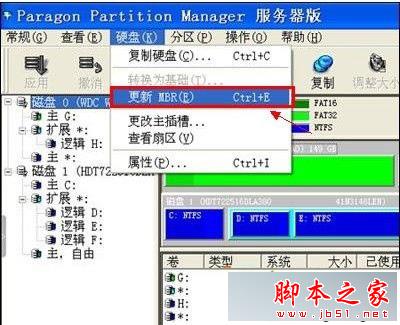
  2. 使用 PQMagic (PartitionMagic) 等分區工具執行「更新 MBR」操作。
  3. 或在命令提示字元下執行:
    fdisk /mbr
    bootsect /nt52 c:
    將 NTLDR 開機程式碼寫入 MBR。

修復完成後重新開機,系統應可正常啟動。建議未來安裝系統優先使用官方原版 ISO,減少此類相容性問題。

Copyright © Windows教程網 All Rights Reserved