Windows 10 Build 9926 早期版本執行 Steam 常發生當機,官方修補前可利用「相容模式」暫時繞過。
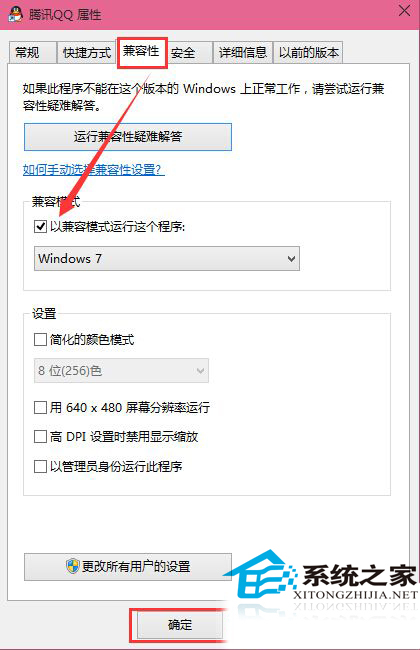
設定後,Win10 將每次以選定版本的相容模式啟動 Steam。此為暫時解法,待 Steam 官方更新適配 Win10 後建議取消相容模式以獲得最佳效能。
Win10/Win8/Win8.1 桌面圖示間距過大/過小如何調整?修改登錄 IconSpacing 與 IconVerticalSpacing
PowerShell 遠端管理 Windows Server (WinRM) 完整設定三步驟
Win10 Mobile 10080 推送時間確認:內測完成,預計本週釋出,新增 Beta Store、通用 Office、更多機型支援
Windows Server 2008 網域設計四大常見誤區與正確觀念解析
Win7 以管理員身分修改其他使用者密碼:電腦管理→本地使用者→設定密碼
Win8 插入 USB 隨身碟無反應、USB 埠失靈?兩種完整解決方案