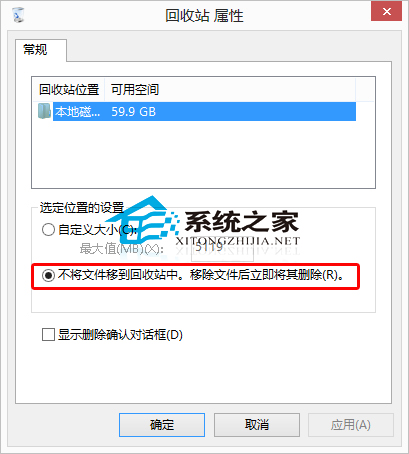
預設刪除檔案會先移至資源回收筒,需再清空才能徹底釋放空間。若確定不需還原,可設定直接永久刪除,提升操作效率。
此設定會跳過確認對話框直接永久刪除,重要檔案誤刪將難以復原。建議僅在處理臨時檔、快取等確定無用資料時啟用,平時保持預設較安全。
解決 Win7 64 位元 ODBC 驅動程式管理員「找不到資料來源名稱」錯誤 (啟用 32 位元應用程式集區)
Win10 logs 資料夾能不能刪?作用解析與清理建議
Win10 Build 9860 內建 MKV 視訊支援:WMP 忽略警告即可播放,Win8.1 無法做到
Windows 10 夏季發布:盜版也能免費升級,騰訊/360/聯想/小米四大管道全解析
Win7 「電腦」右鍵「內容」打不開?群組原則恢復「內容」選單教學
Win10 預覽版 10558 新增「尋找我的裝置」防盜與聚焦鎖屏
Win10 視窗跑到螢幕外怎麼找回?教你一招解決
Windows 8 進入安全模式:透過「進階啟動」重開機選擇啟動設定