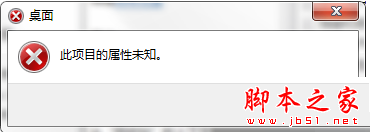
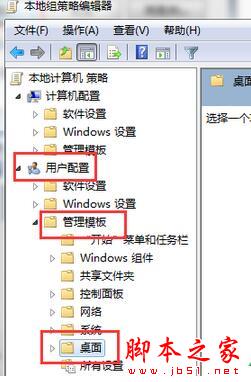
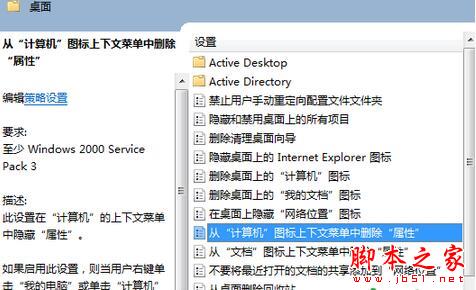
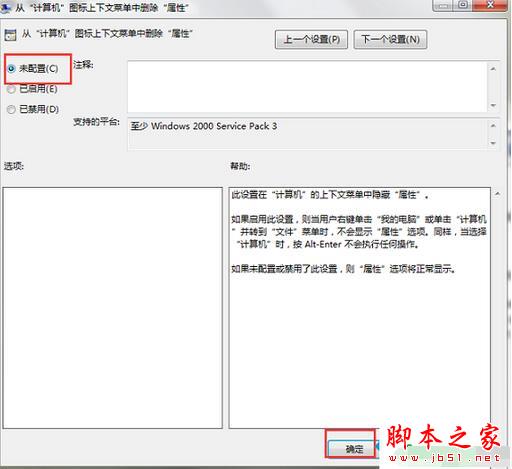
Win7 桌面「電腦」圖示右鍵點「內容」無反應,或選單中沒有「內容」選項。這是群組原則「從『電腦』內容功能表中移除『內容』」被啟用所致,改為「未設定」或「已停用」即可恢復。
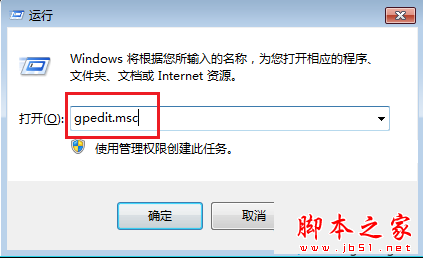
gpedit.msc
設定生效後,「電腦」右鍵選單即恢復「內容」選項。更多 Win7 系統管理技巧請關注本站!
Windows 系統桌面不顯示圖示與工作列的兩種情況解決辦法
誤刪 $Windows.~BT 資料夾怎麼辦?重啟 wudfsvc 服務觸發重新下載
Win7 Enter 鍵不只是換行/確定:五大進階用法大全
Windows 7 USB 隨身碟不顯示磁碟代號?磁碟管理手動指派代號解決
Win10 安裝 Office 2016 報錯 30068-4(1058)?ClickToRun 服務被禁用,啟用服務即可修復
Win10 開始選單程式清單釘選到磚塊面板操作指南
Win7 開啟 Telnet 用戶端/服務圖文教學:控制台啟用 Windows 功能
Win10 內建放大鏡工具路徑與啟動方式:開始選單、搜索框、檔案總管三途徑