操作電腦時常遇到桌面不顯示情況,分兩種狀況分別解決:
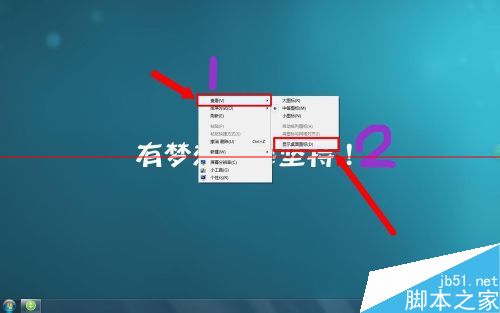
桌面空白處右鍵 → 「檢視」 → 勾選「顯示桌面圖示」。
explorer.exe
C:\Windows\explorer.exe
注意:務必分清屬於哪種情況,錯誤操作無法解決問題。
WinXP 搜尋功能失效?六大解決方案完整彙總
Windows 7 自訂快速啟動列開啟緩慢:MSE 即時掃描導致
Win7 瀏覽器首頁被竄改彈廣告?系統設定 msconfig 禁用啟動項中的網址/網頁捷徑
XP 升級 Win10 僅需 $39.99?限 32 位家庭版、數位下載、正版用戶專屬
Windows XP 系統死機自動重啟設定教程 註冊表修改輕鬆搞定
Windows 7 提示「磁碟受寫入保護」無法複製檔案?登錄與硬體原則雙管齊下解決
微軟呼籲:請勿在 Win10 使用第三方「隱私保護」工具,恐破壞系統功能
Windows Server DHCP 伺服器架設完整實戰教學:安裝、授權、作用域、租約、備份還原