不小心將 .bat 檔案關聯到記事本或其他文字編輯器,導致所有批次檔雙擊開啟變成編輯模式。本文教學恢復 .bat 預設開啟方式(執行模式)。
regedit 開啟登錄編輯器。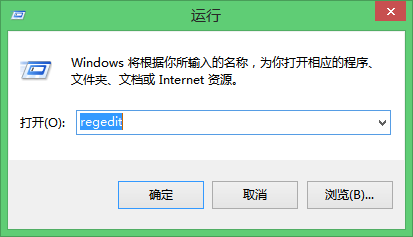
HKEY_CURRENT_USER\SOFTWARE\MICROSOFT\WINDOWS\CurrentVersion\Explorer\FileExts\.bat,刪除 OpenWithList 與 OpenWithProgids 以外的所有項目。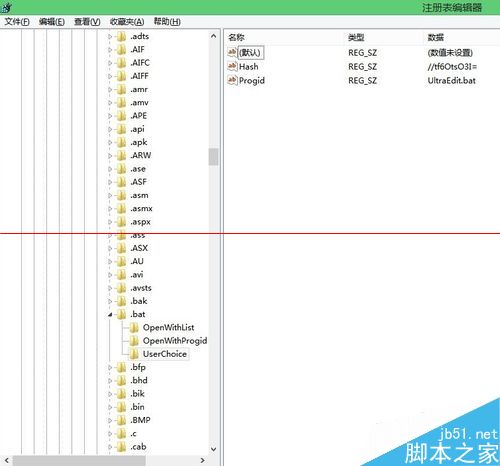
OpenWithList 中刪除預設值以外的所有鍵值;在 OpenWithProgids 中刪除預設值與 lnkfile 以外的所有鍵值。Windows 10 正式版你必須知道的 9 件事:免費升級、多裝置同步、Continuum、Edge、Cortana、虛擬桌面...
Windows 10 如何安裝國際象棋遊戲?完整教學與避坑指南
Windows 10 右鍵選單新增「管理員授權」選項:匯入登錄檔一鍵取得檔案/資料夾完全控制權限
Win7 系統喇叭有雜音怎麼辦?Realtek 音效管理器設定消除雜音
Windows XP 遠端桌面連線 Windows 8 失敗?啟用網路層級驗證 (NLA) 解決
Win10 系統 USB 隨身碟寫保護無法格式化?兩招輕鬆解除