Windows XP Windows 7 Windows 2003 Windows Vista Windows 綜合教學 Linux 系統教學
Windows 10 Windows 8 Windows 2008 Windows NT Windows Server 電腦軟體教學
您现在的位置: Windows教程網 >> Windows教程 >  >> Windows 綜合教學 >> 關於 Windows

Win7 開啟程式跳出「這個程式可能安裝不正確」?關閉相容性助手即可解決

編輯:關於 Windows

Win7 使用者若每次開啟程式都彈出「這個程式可能安裝不正確」對話框,罪魁禍首通常是 程式相容性助手。當系統偵測到相容性問題時會主動提示,實際上只需停用該服務即可徹底解決。
解決步驟

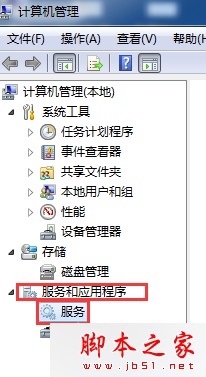
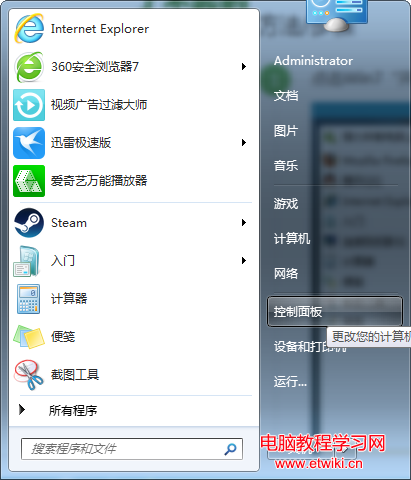
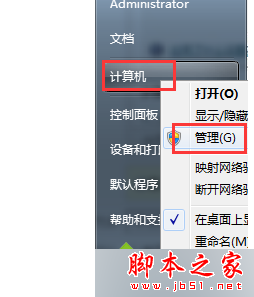
  1. 右鍵點擊「電腦」/「這台電腦」選擇「管理」,開啟電腦管理視窗。
  2. 左側展開「服務與應用程式」>「服務」。
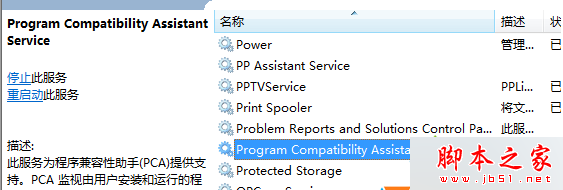
  3. 在右側列表找到 Program Compatibility Assistant Service,雙擊開啟屬性。
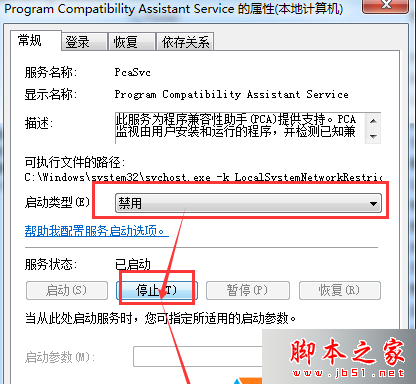
  4. 將「啟動類型」改為「停用」,點擊「停止」按鈕,再按「套用」與「確定」。

完成上述設定後重新開機,彈窗干擾即可消失。若日後需要相容性協助,可隨時將服務改回「手動」或「自動」。

Copyright © Windows教程網 All Rights Reserved