Windows XP Windows 7 Windows 2003 Windows Vista Windows 綜合教學 Linux 系統教學
Windows 10 Windows 8 Windows 2008 Windows NT Windows Server 電腦軟體教學
您现在的位置: Windows教程網 >> Windows教程 >  >> Windows 綜合教學 >> 關於 Windows

Win10 關閉開機歡迎畫面,加快啟動速度的設定教學

編輯:關於 Windows

Windows 10 開機時預設會顯示歡迎畫面與動畫,雖然美觀但會延長啟動時間。透過本地群組原則編輯器可關閉此畫面,讓系統更快進入桌面。

操作步驟

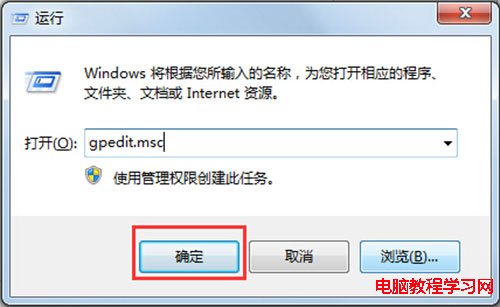
  1. 按 Win + R 開啟「執行」視窗,輸入 gpedit.msc 並按 Enter,開啟本地群組原則編輯器。
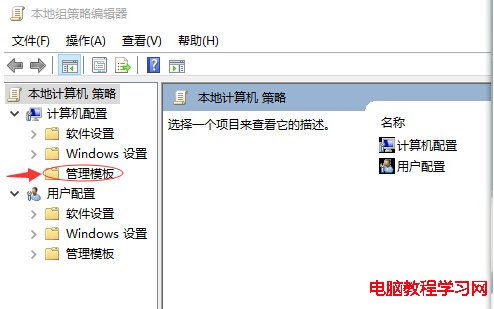
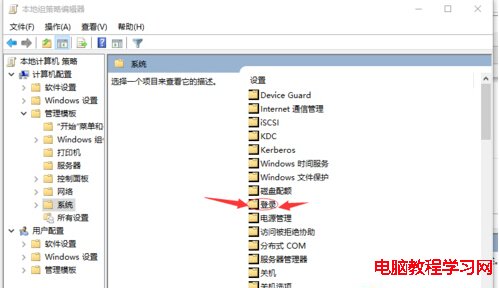
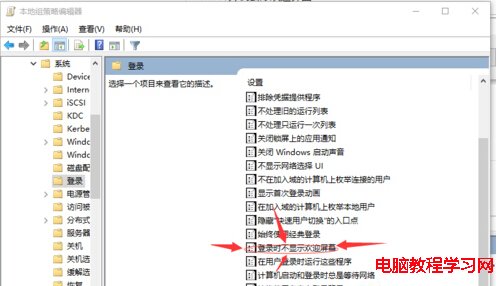
  2. 依序展開:電腦設定 → 系統管理範本 → 系統 → 登入。
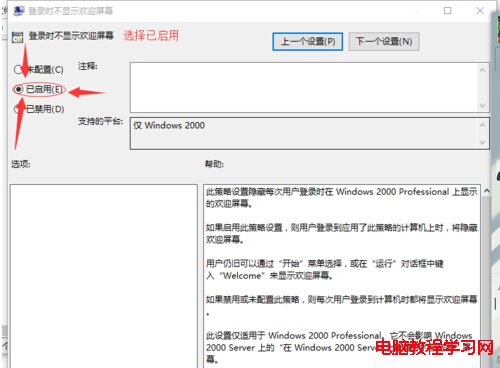
  3. 在右側找到「登入時不顯示歡迎畫面」,雙擊開啟。
  4. 選擇「已啟用」,點擊「確定」套用設定。

重新開機後,系統將直接跳過歡迎畫面進入登入畫面或桌面,有效縮短開機等待時間。

注意:Windows 10 家用版預設不包含 gpedit.msc,需先啟用或使用登錄檔修改對應鍵值 HKEY_LOCAL_MACHINE\SOFTWARE\Policies\Microsoft\Windows\System\DisableLogonBackgroundImage 為 1。

Copyright © Windows教程網 All Rights Reserved