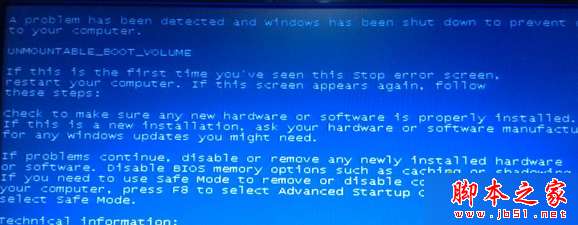
Win7 藍屏代碼 0x000000ED 通常因錯誤操作導致硬碟超負荷罷工。解決方向:
溫馨提醒:避免同時開啟過多程式,配置不足的電腦極易觸發此藍屏。
Windows 7 安裝程式衝突「另一程式正在安裝」完美解決方案
找不到 $Windows.~BT 資料夾?確認 SP1/關鍵更新 KB3035583 已安裝並啟用顯示隱藏檔案
Win10 新版「鬧鐘與時鐘」更新:支援動態磚、世界時鐘、多計時器與秒錶
Windows 8 將應用程式固定到 Metro 開始畫面:三步驟快速建立專屬啟動磚
深度體驗 Windows 10:融合經典與創新的全新篇章
微软推送 Win10 Mobile 10166 开发者增强更新 非全版本升级
Win7 一鍵變「豆沙綠」護眼模式,拯救程式員的眼睛
Win8 如何隱藏檔案?將檔案隱藏在圖片中 (隱寫術) 教程