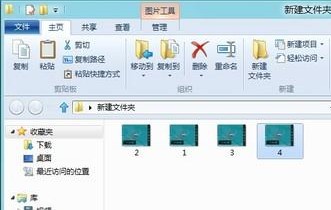
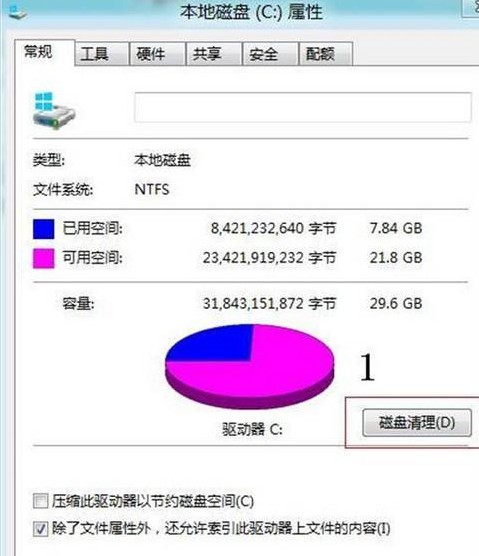
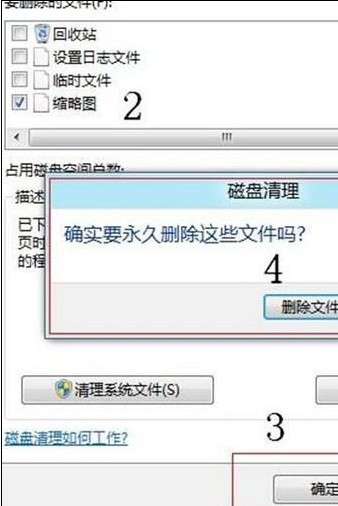
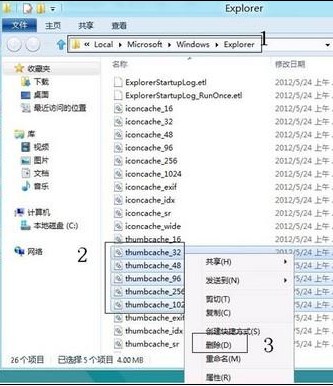
Windows 8 瀏覽圖片不顯示縮圖,通常是縮圖快取檔案損毀。提供兩種重建快取方法:
%USERPROFILE%\AppData\Local\Microsoft\Windows\Explorer
thumbcache_32.db
thumbcache_96.db
thumbcache_256.db
thumbcache_1024.db
清除完成後重新開啟圖片資料夾,縮圖即可正常顯示。
Win10 Mobile 週年更新 14393.594 預覽版推送(Release Preview 通道),修復 Bug 提升穩定
Windows RT 重置登入密碼教程:Shift + 重啟進入修復模式初始化
Win7 磁碟管理工具新增分區完整教學:無損分割 250GB 新磁碟
Win8 開機提示「你的電腦出現問題需要重新啟動」解決方案:Netsh 重置 WinHTTP Proxy
Win10 OneNote 啟用自動同步筆記本功能圖文教程
最新 Windows 10 技術預覽版登錄編輯器改進:右鍵快速跳轉同名機碼
Win8 重新安裝 IE10 瀏覽器:關閉 Windows 功能再開啟圖文教學
Windows 7 修補程式要不要裝?打補丁原則與離線部署最佳實務