Win8 內建 IE10,若因設定錯誤或損壞導致無法使用,可透過「開啟或關閉 Windows 功能」移除再重新安裝,無需下載安裝檔。以下為完整步驟。
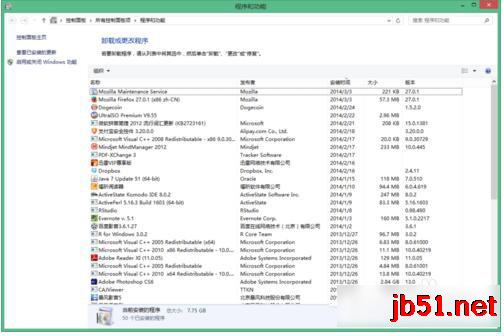
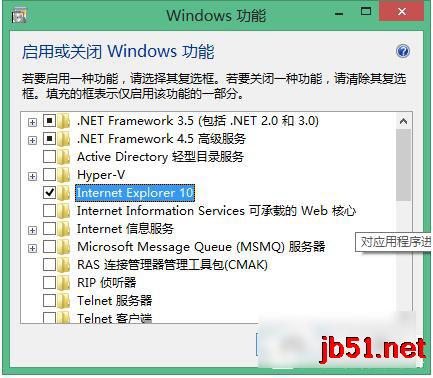
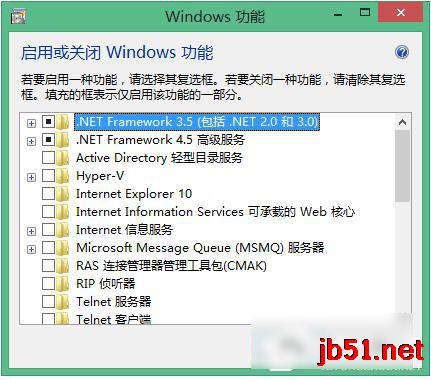
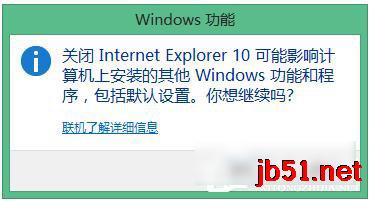
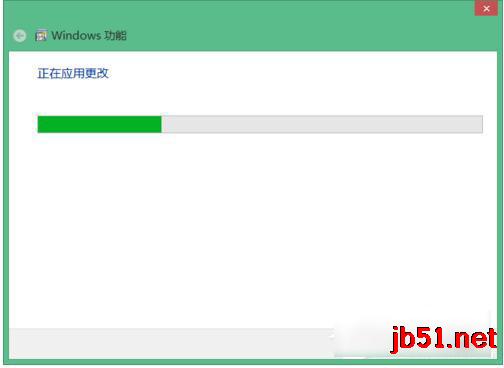
原理:IE 在 Win8 屬於 Windows 選用功能元件,關閉即移除所有二進位檔案與登錄設定,重新勾選會從元件存放區 (WinSxS) 還原乾淨版本,等同重裝。
同樣方法適用於 Win7 (IE11)、Win10 (IE11),只需在功能清單中找到對應版本操作即可。
Windows 10 取消開機登入密碼兩大法圖文教學:netplwiz 與來賓帳戶法
Win10 家庭版終於可關閉商店應用程式自動更新!KB3081448 更新後開關解鎖
Win7 開啟 Word 提示「目前使用者未安裝 Microsoft Office」修復教學
Windows 10 登錄檔編輯器被鎖定?群組原則一鍵解鎖教學
Win10 Build 10049 登入桌面藍畫面卡住?微軟官方暫時解決方案:Win+L 鎖定重登或 Ctrl+Shift+Esc 開啟工作管理員
Windows 8/8.1 如何取消開機鎖定畫面?直接進入登入介面加快開機速度
Win32 轉制 Win10 UWP (Project Centennial) 完整優勢清單:動態磚、通知、乾淨安裝、商店變現、跨裝置推廣