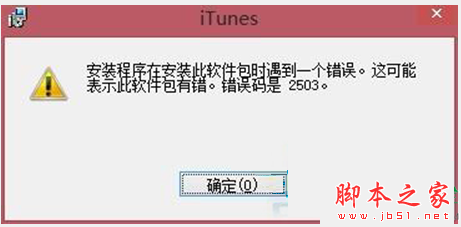
Win8 安裝 iTunes 報錯 2503,通常因版本不符 (32/64 位)、殘留舊版 Apple 元件、權限不足。解法:
徹底清理舊元件是關鍵,否則反覆報錯。
Win10 內建應用程式不小心刪除了?教你從 Microsoft Store 輕鬆找回
Win7 系統備份還原提示錯誤代碼 0X80042302?啟用 Volume Shadow Copy 服務解決
Windows 10 Mobile 支援裝置型號清單曝光 (非官方)
Windows 7 如何設定待機/睡眠時間?自訂電源計劃完整教學
Windows 7 無法玩騰訊遊戲 (CF、QQ飛車)?關閉應用程式相容性引擎一鍵解決
Win7 設定開機密碼保護隱私:控制台使用者帳戶建立登入密碼
Win7 刪除檔案提示「回收站已損壞」怎麼修?CMD 重建回收站兩條指令搞定
回顧歷代 Windows 系統演進:從 Windows 1.0 到 Windows 10 的三十年