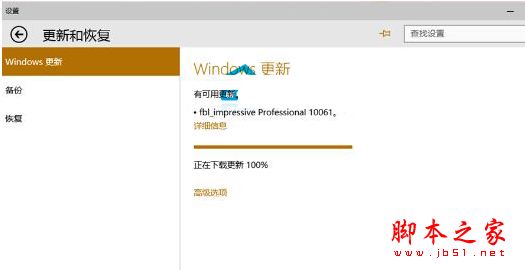
Win10 更新速度快但實際升級體驗不一。有用戶反饋通過 Windows Update 下載安裝更新時卡在「正在下載更新 100%」動不動。解決方法如下:
Windows\Distribution\Software
若 Windows Update 升級持續失敗,建議下載鏡像全新安裝!
以上就是升級 Win10 10061 卡 100% 解決辦法,供參考。
XP 系統 ekrn.exe 佔用 CPU 100%?關閉 NOD32 監控並清理 Windows Update 快取解決
Win10 地圖 App 開啟一片空白?設定→系統→離線地圖→下載地圖資料即可正常使用
Win10 關閉 Windows 錯誤報告:群組原則一鍵停用
Windows 10 任務列 QQ 圖示不見解決辦法:通知區域設定顯示圖示與通知
Windows 10 設定開機歡迎語/提示訊息教學:群組原則自訂登入標題與文字
Win8 系統檔案損壞/遺失?SFC 與 DISM 雙工具修復教學
WinXP 使用複印機掃描文件完整圖文教學
Windows 7 完整安裝圖文教學:從 ISO 解壓到桌面全過程記錄