部分筆電插入耳機時會彈出 SmartAudio 視窗,這是聲卡驅動附帶程式,若不需要可透過停用服務關閉提示:
msconfig 按確定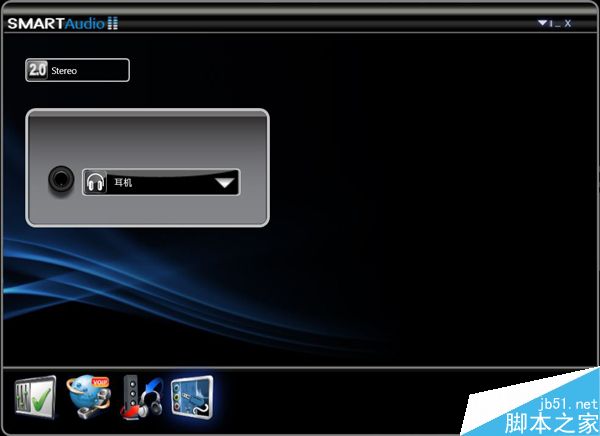
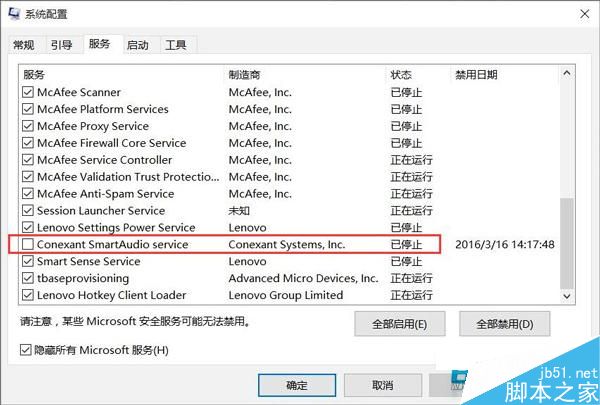
停用該服務即可禁用 SmartAudio,不再彈出提示視窗。
什麼是 Windows PE?預安裝環境核心功能與實戰應用詳解
Windows 7 筆電電源鍵誤觸?調整電源按鈕動作避免意外關機
Win10 Spartan 瀏覽器雙種標題列介面曝光 實驗性標題列更美觀
Win10 應用圖示灰色無法點擊/閃退?清除 Windows Store 快取、重置 Store 服務、SFC 修復六大方案
Windows 7 網路印表機連線正常但無法列印?IP 位址不符排查教學
Win10 14393 版本便利貼不見了?一鍵喚醒 Windows Ink 工作區找回便箋
Windows 10 Windows Defender 無法啟動/開啟修復:第三方安全軟體卸載後服務異常,sc start WinDefend Enable 指令一鍵修復