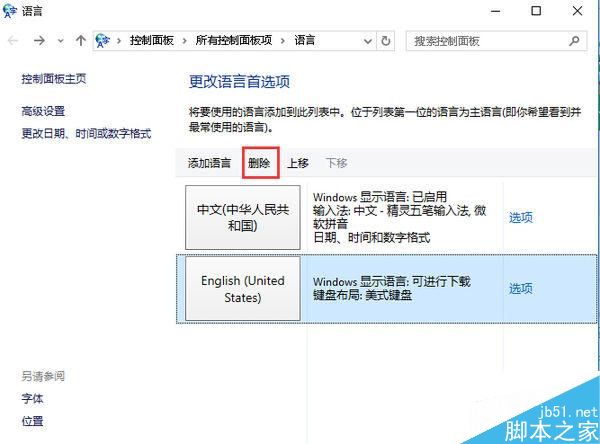
Win8.1 系統預設包含美式鍵盤,若已安裝中文輸入法且不需要英文鍵盤,可依下列步驟移除:
移除後即不需每次輸入都切換輸入法,操作更順暢。
Win7 登錄編輯器無法開啟修復:群組原則啟用註冊表編輯工具存取
Win10 筆電觸控板怎麼關閉?設定→裝置→滑鼠與觸控板→其他滑鼠選項→裝置設定→停用
Windows 7 開機提示 "Disk Read Error" 硬碟讀取錯誤完整排查流程
Win7 如何查看顯示卡型號?兩種內建工具快速檢視教學
Win10 永久啟用密鑰是什麼?KMS 啟用流程與常用 GVLK 密鑰分享 (含驗證指令)
查看 WinXP 系統安裝年齡:systeminfo 指令顯示原始安裝日期
Win10 控制面板界面泄露:经典两栏式消失,改为搜索框+分类项,标题栏巨变,延续 20 年经典面板终结
Win7 安裝網路印表機完整圖文教學:自動搜尋與驅動安裝