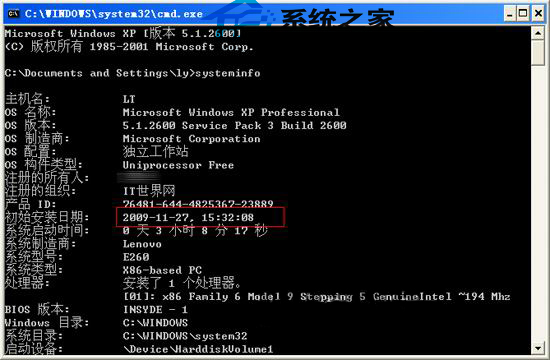
想知道 XP 系統陪伴你多久?命令列一鍵查詢原始安裝日期(即使經過 Ghost 還原,仍顯示母盤安裝時間)。
cmd
systeminfo
同時可查看主機名、處理器、網卡、已安裝修補程式總數等完整系統資訊,適合資產盤點、故障排查參考。
Win10 累積更新 KB3116900 詳細內容:版本升至 10586.29,修復 7 項安全漏洞
Windows XP 不再安全:Qbot 木馬感染 50 萬裝置竊取 80 萬銀行憑證
微軟公布 Win10 預覽版到期時間表:早期三版本 4/30 禁止啟動,新版 10/15 結束
Win10 Mobile 正式版大規模推送至 3 款 BLU 手機機型
Win10 桌面新增應用程式捷徑圖示(電腦、控制台、使用者檔案等)
Win7 重裝系統完整圖文教學:USB 開機、BIOS 設定、一鍵安裝全流程
Win10 降級回 Win7/Win8.1 完整教學:系統回復功能 30 天後悔藥
最快最簡單!USB 開機安裝 Windows 10 正式版完整圖文教學