Windows 10 工作列右下角時間顯示「2016-mm-30」而非月份,這是日期格式解析的小 Bug。只需重新套用短日期格式即可修復。
yyyy/MM/dd)。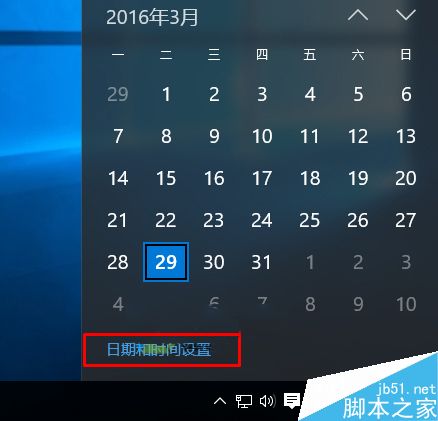
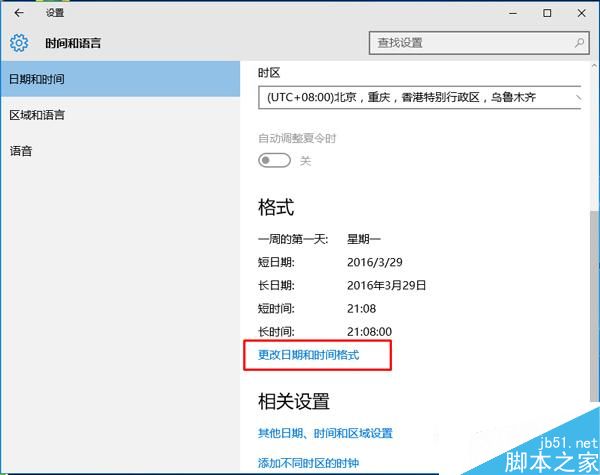
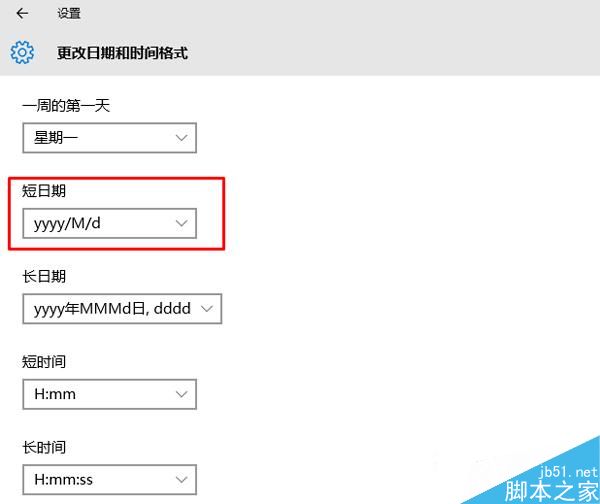
這只是個微小的介面刷新問題,操作簡單即可解決。
Windows 桌面備份三大妙招:RAR 一鍵打包、TIB 虛擬磁碟、ISO 映像檔
Win10 正式版後首個 Build 更新即將推送?TH2 分支內測在即
Win8.1 安裝程式出現「內部錯誤 2203」導致安裝失敗?權限修正法完整教學
Windows 10 Build 10130 自訂 3D 文字螢幕保護:啟用隱藏控制台項目並設定專屬動態文字
Win10 磁碟分區調整教學:用分區助手縮小 C 擴充 D/E 槽
系統變慢、C 盤空間不足?批次檔清理暫存檔 + 專業清理工具 + 軟體遷移非系統盤