Windows XP Windows 7 Windows 2003 Windows Vista Windows 綜合教學 Linux 系統教學
Windows 10 Windows 8 Windows 2008 Windows NT Windows Server 電腦軟體教學
您现在的位置: Windows教程網 >> Windows教程 >  >> Windows 綜合教學 >> 關於 Windows

升級 Win10 後開機提示 igfxHK module 已停止運作?刪除 Intel 圖形熱鍵模組即可

編輯:關於 Windows

升級 Windows 10 後,開機時彈出 「igfxHK module 已停止運作」 錯誤視窗。此模組為 Intel 顯示卡圖形熱鍵介面模組 (igfxHK.exe),負責處理熱鍵組合(如 Ctrl+Alt+F1 切換顯示模式)。升級後舊版驅動殘留與新系統不相容導致崩潰,刪除該檔案即可解決,不影響顯示輸出效能。
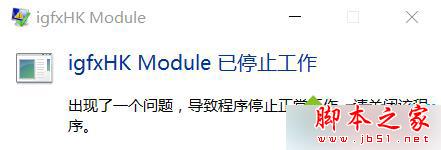
igfxHK module 已停止運作錯誤

故障成因

Intel 顯示卡驅動升級/遷移至 Win10 時,igfxHK.exe 舊版本未被正確移除或更新,與新版圖形指令介面衝突導致例外崩潰。此模組屬輔助功能,非核心顯示管線,移除安全。

解決步驟

  1. 開啟檔案總管,瀏覽至:
    C:\Windows\System32\igfxHK.exe
  2. 若檔案存在 → 滑鼠右鍵 → 「內容」→ 「安全性」→ 「進階」→ 變更擁有者為目前使用者/Administrators → 套用。
  3. 取得權限後 → 刪除 igfxHK.exe(或重命名為 igfxHK.exe.bak)。
  4. 重新開機驗證,錯誤視窗不再出現。

延伸閱讀

• Win10 系統 IE 錯誤提示「Internet Explorer 已停止運作」怎麼辦?

補充建議: 刪除 igfxHK.exe 後,建議前往 Intel 官網下載中心 依據晶片組/顯示卡型號安裝最新 Intel Graphics Driver (DCH 驅動),徹底解決相容性隱患並獲得效能優化。

Copyright © Windows教程網 All Rights Reserved