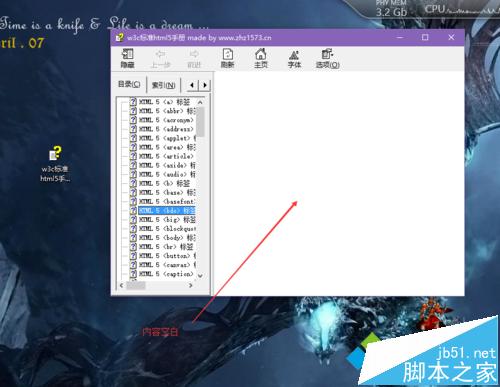
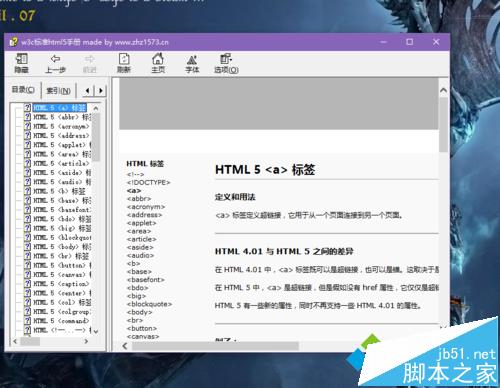
Win7/Win8.1 下開啟 .chm 說明檔案內容全白、目錄可見但無正文。非中毒、非檔案損壞,而是 Windows 附件管理機制 (Mark of the Web) 將下載/複製自網路/外部來源的 CHM 標記為「不安全區域」,HTML Help 查看器 (hh.exe) 基於安全策略拒絕渲染內容。解法:檔案右鍵 → 內容 → 一般索引標籤 → 勾選「解除鎖定」 → 確定 → 重新開啟。
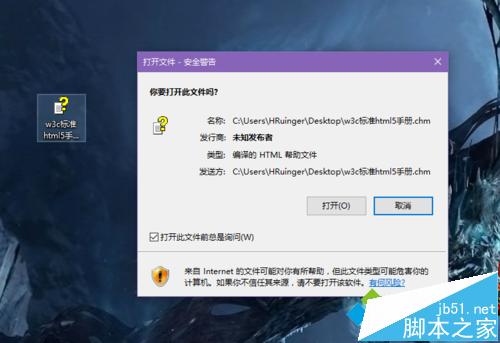
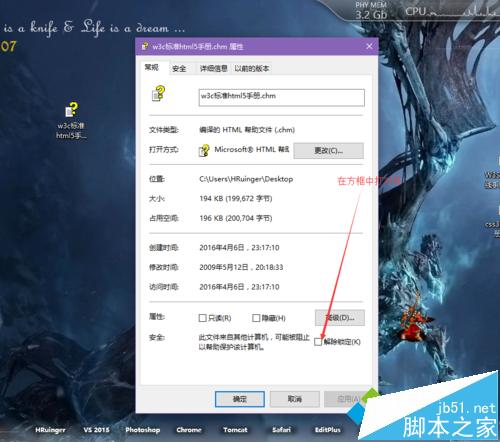
:Zone.Identifier 儲存區域識別碼 (ZoneId=3 為網際網路區域)。HKEY_CURRENT_USER\Software\Microsoft\HTML Help\1.x\ItssRestrictions 中 MaxAllowedZone 預設為 1 (區域內網),網際網路區域 (3) 被封鎖渲染。:Zone.Identifier ADS,ZoneId 回歸本機 (0),hh.exe 允許渲染。Get-ChildItem -Path "D:\Docs" -Filter *.chm -Recurse | ForEach-Object {
Unblock-File -Path $_.FullName
Write-Host "已解除鎖定:" $_.FullName
}
或使用 Streams.exe (Sysinternals):streams -d -s D:\Docs\*.chm。
小米 4 可升級 Win10 Mobile 10581:內測用戶可郵寄北京刷機,2GB 記憶體版適配中,解除部分限制
Windows 延遲寫入失敗解決方案:磁碟檢查修復受損系統檔案
Win10 開機啟動項管理完整教學:任務管理器、啟動資料夾、登錄檔三大法
Windows XP 取消工作列通知區域自動隱藏非作用中圖示
Win7 VirtualBox 虛擬機開機自動後台啟動:Headless 模式 + 啟動資料夾腳本
Windows 10 以系統管理員身分開啟命令提示字元三大法:Win+X+A、Win+X 選單、開始選單搜尋