Windows XP Windows 7 Windows 2003 Windows Vista Windows 綜合教學 Linux 系統教學
Windows 10 Windows 8 Windows 2008 Windows NT Windows Server 電腦軟體教學
您现在的位置: Windows教程網 >> Windows教程 >  >> Windows 綜合教學 >> 關於 Windows

Windows 8 內建燒錄功能完整教學:無需第三方軟體即可燒錄資料光碟

編輯:關於 Windows

Win8/8.1 自帶「燒錄到光碟」功能,操作直覺,無需安裝 Nero 等第三方工具。以下為詳細步驟:

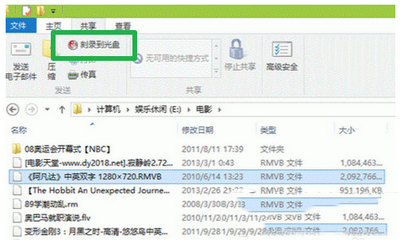
  1. 選取欲燒錄的檔案/資料夾 → 功能區「共用」索引標籤 → 點擊「燒錄到光碟」。
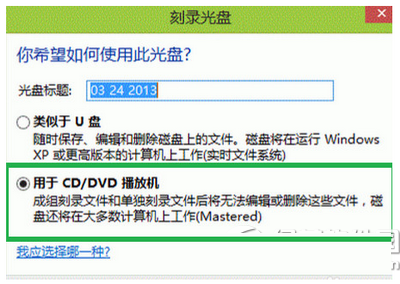
  2. 放入空白光碟,彈出對話框選擇「用於 CD/DVD 播放機」(Live File System 格式,相容性最佳)。
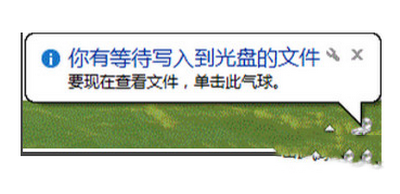
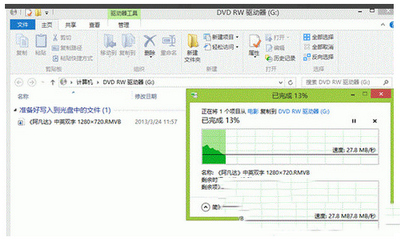
  3. 點擊「下一步」,系統開始複製檔案至光碟機暫存區(右下角氣泡提示「有檔案待寫入」)。
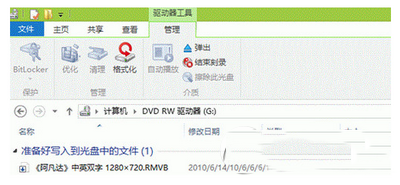
  4. 點擊氣泡進入光碟機視窗 → 「管理」索引標籤 → 「完成燒錄」。
  5. 設定光碟名稱與燒錄速度(可用預設)→「下一步」→ 燒錄完成自動彈出光碟。
Copyright © Windows教程網 All Rights Reserved