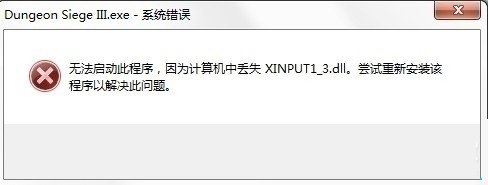
執行遊戲/程式提示「找不到 xinput1_3.dll」,單純下載 DLL 放入系統目錄無效,真因是缺少 DirectX 執行階段元件。
解決方案
- 安裝 DirectX 執行階段:遊戲需 DirectX 10+,下載安裝完整 DirectX 執行階段庫(含 xinput1_3.dll 等元件)即可解決。
- 360 安全衛士修復:功能大全 → 人工服務 → 輸入「缺少 XINPUT1_3.dll」 → 立即修復。



補充:若必須手動放置 DLL
- 32 位系統:
C:\Windows\System32
- 64 位系統:
C:\Windows\SysWOW64
核心解法是安裝 DirectX 執行階段,而非單檔複製。