Windows XP Windows 7 Windows 2003 Windows Vista Windows 綜合教學 Linux 系統教學
Windows 10 Windows 8 Windows 2008 Windows NT Windows Server 電腦軟體教學
您现在的位置: Windows教程網 >> Windows教程 >  >> Windows 綜合教學 >> 關於 Windows

Win10 應用商店下載報錯 0x80073CF9 兩大修復方案

編輯:關於 Windows

Win10 應用商店所有應用下載失敗,錯誤代碼 0x80073CF9。提供 PowerShell 重新註冊商店與清除快取兩種修復法。

方案一:PowerShell 重新註冊 Windows Store

  1. 「開始」→ 「Windows PowerShell」右鍵 → 「更多」 → 「以系統管理員身分執行」。
  2. 輸入指令:
    manifest = (Get-AppxPackage Microsoft.WindowsStore).InstallLocation + '\AppxManifest.xml' ; Add-AppxPackage -DisableDevelopmentMode -Register $manifest
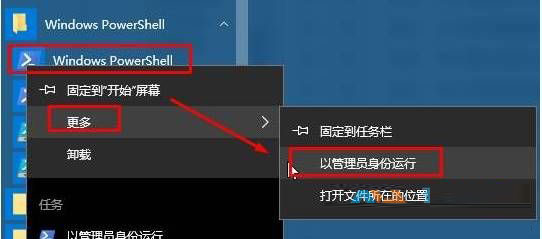
    按 Enter 執行修復。

方案二:停用 Windows Update 服務 + 清除 Store 快取

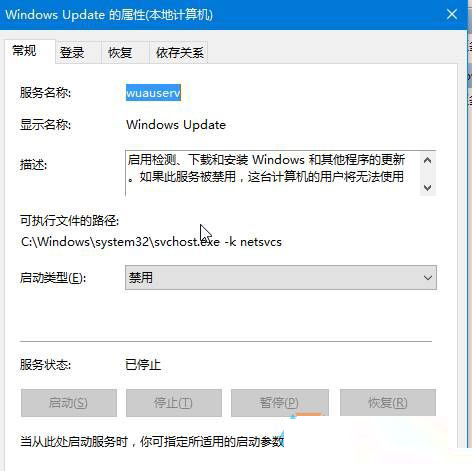
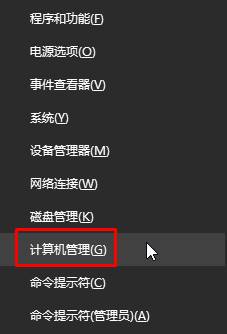
  1. Win+X → 「電腦管理」 → 「服務與應用程式」 → 「服務」 → 停用 Windows Update。
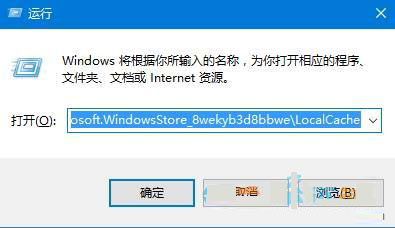
  2. Win+R 執行:
    %USERPROFILE%\AppData\Local\Packages\Microsoft.WindowsStore_8wekyb3d8bbwe\LocalCache
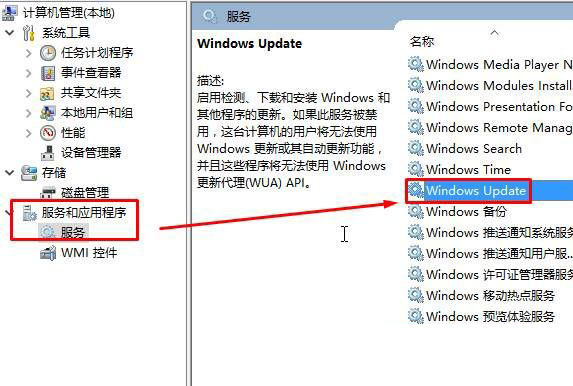
  3. 刪除資料夾內所有內容。
  4. 重新啟用 Windows Update 服務。

方案一修復商店應用本體註冊;方案二清除損壞的本地快取,兩者可單獨或組合使用。

Copyright © Windows教程網 All Rights Reserved