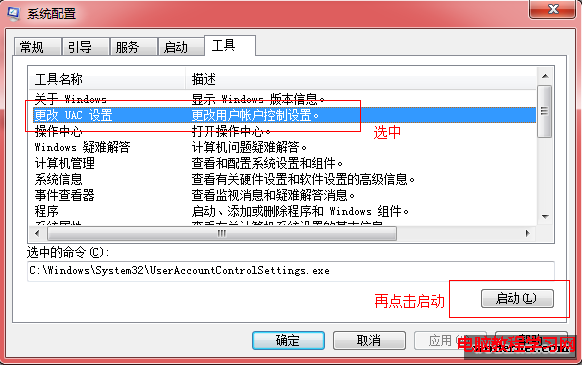
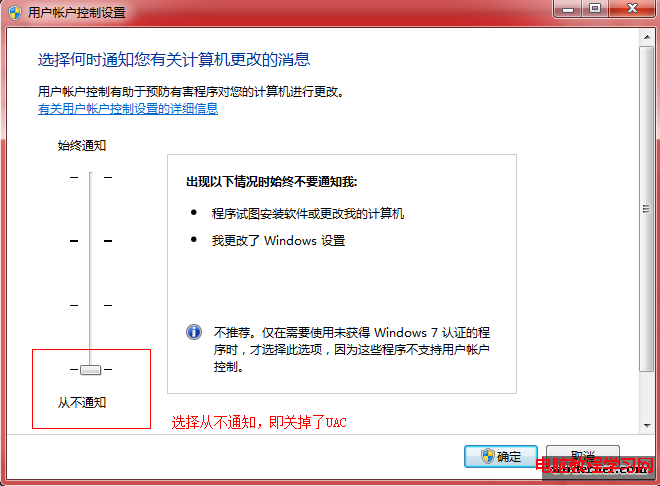
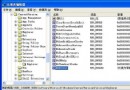
使用者帳戶控制 (UAC) 除了在控制面板調整,也可透過 系統設定工具 (msconfig) 快速開啟 UAC 設定頁面並關閉。
msconfig
Win7 一鍵還原圖文教學:系統還原功能完整操作指南
Windows 10 RTM 本週發布在即,首個候選版 Build 10176 曝光
PowerShell 一鍵將伺服器升級為網域控制站:ADDSDeployment 模組完整腳本
Win10 10158 註冊綁定會員版教學:免費使用一年、接收會員版本更新
騰訊 QQ 電腦管家如何檢測並下載安裝 Win10?完整圖文教學
Win10 一週年更新版 CLSID (GUID) 完整彙總表
Win10 RedStone 重大更新正式开工:Build 11xxx 系列、rs1_onecore 分支现身,最早 2016 年 6 月推送
Win10 正式版 10586.79 累積更新 KB3136562 下載與安裝說明