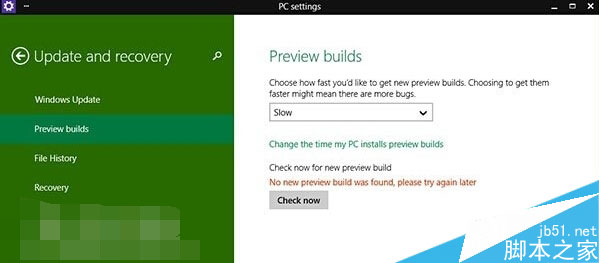
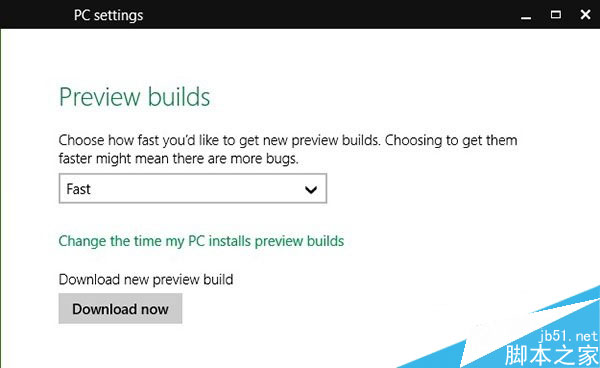
Windows 10 Build 9879 屬於 Fast 環(快速通道)版本,若在「預覽體驗計畫」設定中仍停留在 Slow 通道,將收不到更新推送。只需將通道切換為 Fast 並點擊「立即檢查更新」即可解決。
解決步驟
- 開啟 設定 → 更新與安全性 → Windows Update → 進階選項。
- 在「選擇預覽版本安裝方式」下拉選單選擇 Fast。
- 點擊 「立即檢查更新」,系統將偵測並下載可用更新。
- 出現下載提示後,按 「立即下載」 開始更新。
背景知識:微軟預覽版推送機制
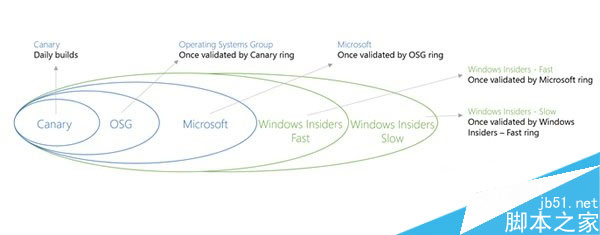
微軟將 Insider Preview 分為多個環(Ring):
- Canary / Dev(內部/開發者):最新代碼,穩定性最低。
- Beta / Fast:經初步測試,功能較完整,適合尋鮮者(Build 9879 屬此層)。
- Release Preview / Slow:接近正式版,穩定性最高(Build 9860 屬此層)。
只有選擇對應環別,才能接收該層級的建置版本推送。