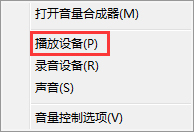
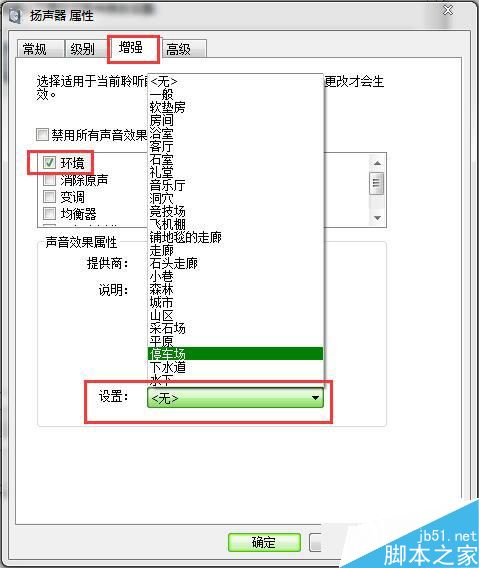
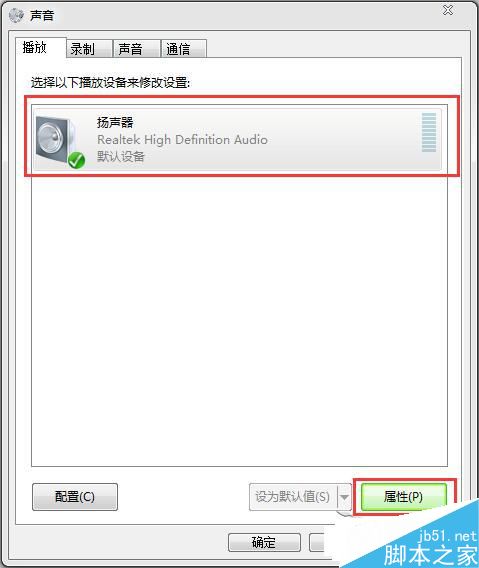
Win7 內建環境音效可模擬不同空間聲場(如浴室、石室、講堂等),提升聽覺體驗。
依喜好選擇不同環境音效,豐富多媒體體驗。更多 Win7 聲音設定技巧請關注本站!
Win7 開啟 USB 隨身碟顯示「I/O 裝置錯誤」?變更磁碟機代號即可修復
Windows 7 修改暫存檔路徑:將 TEMP/TMP 移出 C 槽,防止系統變胖變慢
Windows 8 查看電腦規格兩大法:電腦設定與 DirectX 診斷工具
Win10 升級後網路受限/無法上網?兩種解決方案:診斷修復或啟用 FIPS 相容性
Windows 8 找回刪除檔案確認對話框:啟用回收站顯示刪除確認
Win7 運行《極品飛車 10》卡頓?禁用 TextServicesFramework 任務計劃徹底解決
Windows XP 清除系統暫存檔案:Temp 資料夾手動刪除釋放磁碟空間
Windows 10 設定通知免打擾時間:透過群組原則指定靜默時段