Windows XP Windows 7 Windows 2003 Windows Vista Windows 綜合教學 Linux 系統教學
Windows 10 Windows 8 Windows 2008 Windows NT Windows Server 電腦軟體教學
您现在的位置: Windows教程網 >> Windows教程 >  >> Windows 綜合教學 >> 關於 Windows

Windows XP 清除系統暫存檔案:Temp 資料夾手動刪除釋放磁碟空間

編輯:關於 Windows

Windows XP 使用久了會累積大量暫存檔佔用磁碟空間、降低系統速度。手動清除兩個主要 Temp 資料夾可有效釋放空間。本文提供路徑與操作步驟。

清除路徑與步驟

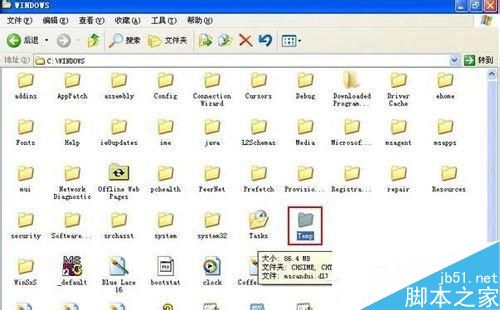
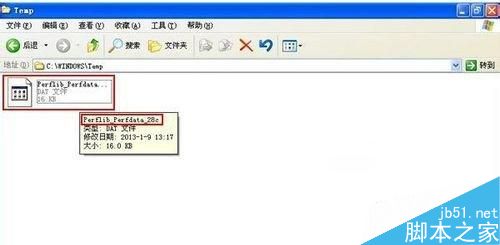
  1. 系統暫存檔:C:\Windows\Temp
     開啟資料夾,除 Perflib_Perfdata_XXX 等鎖定檔案外,全選刪除。
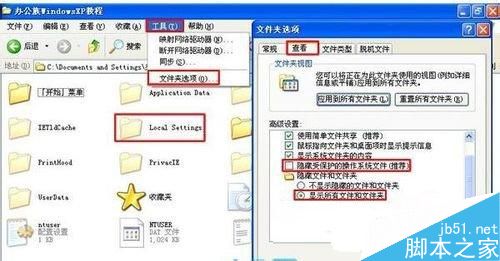
  2. 使用者暫存檔:C:\Documents and Settings\<使用者名稱>\Local Settings\Temp
     若找不到「Local Settings」,開啟「資料夾選項」→「檢視」→ 勾選「顯示隱藏檔案和資料夾」、取消勾選「隱藏受保護的作業系統檔案」,即可看見。全選刪除。

Windows Temp 資料夾

刪除暫存檔

資料夾選項顯示隱藏檔案

補充建議

  • 可建立 .bat 批次檔自動清理:del /q /f /s %temp%\* del /q /f /s C:\Windows\Temp\*。
  • 搭配磁碟清理工具 (cleanmgr) 清除系統更新備份、錯誤報告等其他垃圾檔。
  • 定期清理暫存檔,保持系統運作流暢、磁碟空間充裕。
  • Windows XP 已停止支援,建議升級至支援中作業系統。

手動清除 Temp 資料夾垃圾檔,讓 Windows XP 輕裝上陣,運作更順暢!

Copyright © Windows教程網 All Rights Reserved