隨著時間推移,C 槽空間被大量暫存檔佔用,導致系統變慢。Windows 7 允許透過環境變數修改 TEMP、TMP 資料夾位置,將暫存檔導向其他分割區,保持系統盤精瘦。
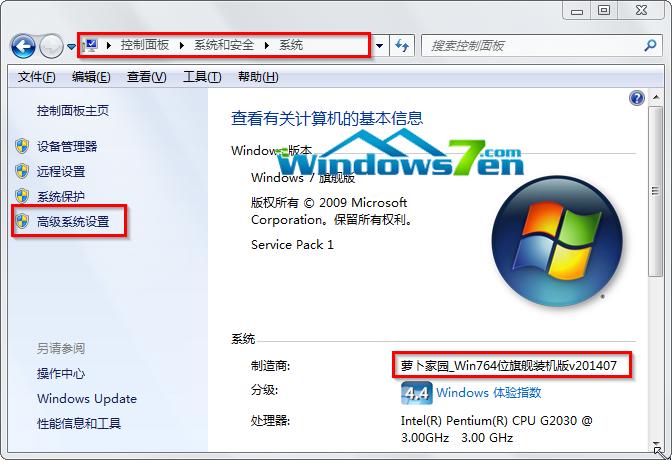
圖 1:進階系統設定
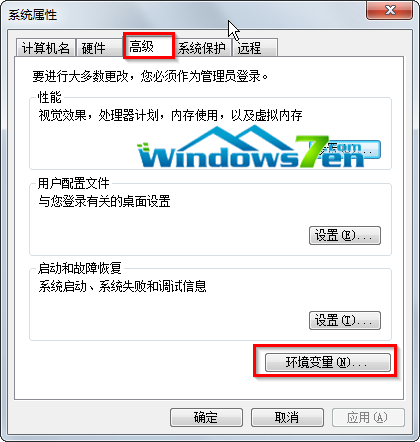
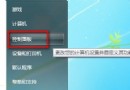
圖 2:開啟環境變數
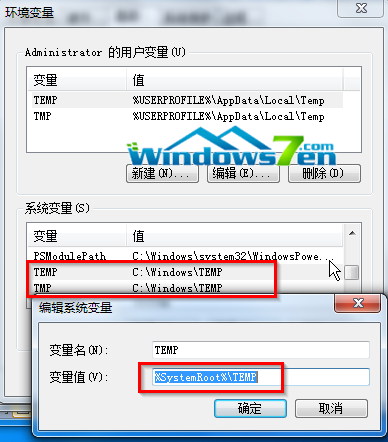
TEMP
TMP
圖 3:修改暫存檔路徑
雖然移動暫存檔路徑能緩解 C 槽膨脹,但仍建議定期手動清理暫存檔,維持系統最佳效能。
Win10手機版Build 10070辦公應用曝光:Word Preview磚磚加入,動態磚磚間距縮小
升級 Win10 後玩 LOL 提示記憶體不足?調整虛擬記憶體設定完美解決
刪除 Win10 免費升級推播圖示:解除安裝 KB3035583 更新
Windows XP 必會執行指令精選:從 gpedit.msc 到 sfc /scannow
Win10 正式版第二波推播最快下周啟動 尚未收到請耐心等待
Windows 10 如何進入 TCP/IP 進階設定?圖解逐步操作路徑
Win10 藍屏代碼 win32kfull.sys?重啟/玩遊戲兩種場景精準修復指南
Win7 睡眠喚醒後拒絕存取?關閉再開啟休眠功能修復教學