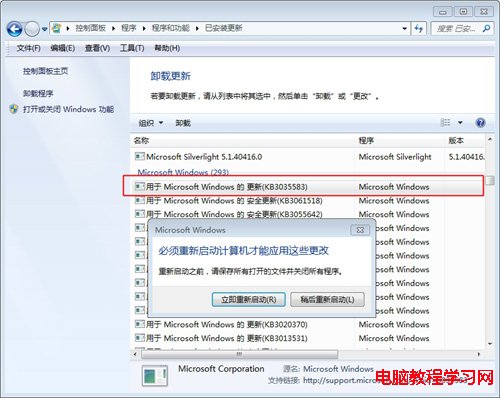
Windows 7/8 任務列右下角常駐「取得 Windows 10」圖示 (GWX.exe),無法關閉隱藏。解除安裝觸發該推播的更新 KB3035583 即可移除。
重開機後推播圖示消失。若 Windows Update 再次推送 KB3035583,於更新清單中取消勾選並右鍵「隱藏更新」即可永久封鎖。
Win8 最快叫出控制台的三種技巧
Win10 系統檔案損壞怎麼修復?DISM 指令線上修復 + SFC 雙重保障完整教學
【圖文】Win10 Build 9879 啟用 Aero 毛玻璃效果完整教學 (僅 64 位元)
Win10 Build 9926 開啟 Aero 透明特效:Aero Glass Tweaker + Classic Shell 雙工具法
Windows XP 系統死機自動重啟設定教程 註冊表修改輕鬆搞定
奇怪的 Windows 7 安裝錯誤:選擇地區即可解決
Win7 設定 5.1 環繞聲道:播放裝置 → 設定揚聲器 → 選 5.1 環繞完成精靈
Win7 升級 Win10 後如何關閉系統自動更新?服務中停用 Windows Update