Windows XP Windows 7 Windows 2003 Windows Vista Windows 綜合教學 Linux 系統教學
Windows 10 Windows 8 Windows 2008 Windows NT Windows Server 電腦軟體教學
您现在的位置: Windows教程網 >> Windows教程 >  >> Windows 綜合教學 >> 關於 Windows

Win7 無法啟用 ReadyBoost?啟用 Superfetch 服務即可解決

編輯:關於 Windows

Win7 插入 USB 隨身碟想啟用 ReadyBoost 加速,卻發現選項無法勾選。主因是 Superfetch 服務被停用,ReadyBoost 依賴 Superfetch 運作。將 Superfetch 設為 自動 並啟動,ReadyBoost 即可正常使用。
ReadyBoost 無法啟用

解決方法

  1. 開啟 services.msc (或控制台→系統管理工具→服務)。
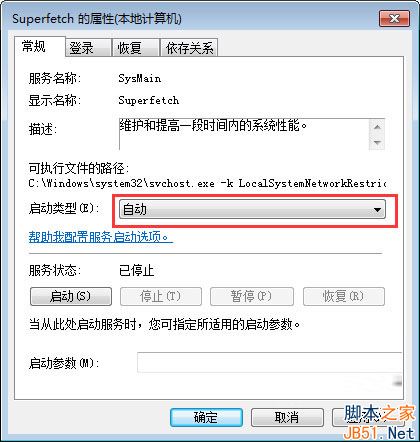
  2. 找到 Superfetch → 雙擊 → 啟動類型 改 自動 → 套用 → 啟動 → 確定。
  3. Superfetch 服務設定

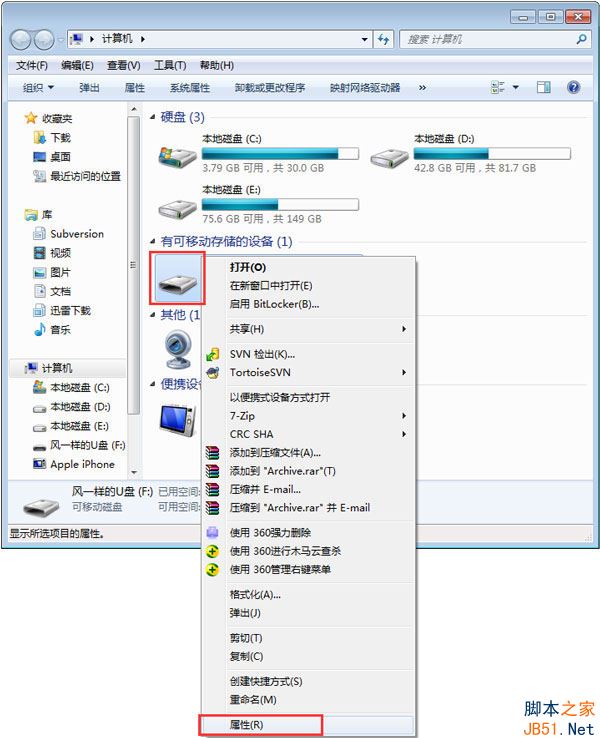
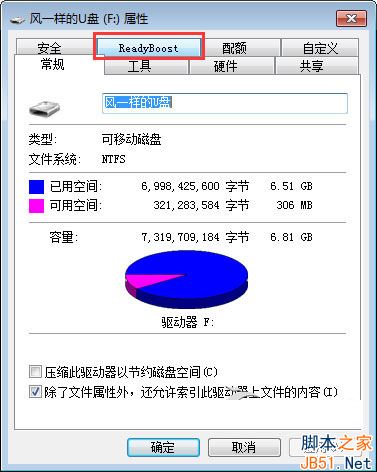
  4. 右鍵 USB 隨身碟 → 內容 → ReadyBoost 分頁,即可正常設定使用空間。
  5. ReadyBoost 設定頁

    ReadyBoost 可用

原理:Superfetch 負責預讀快取管理,ReadyBoost 利用隨機讀寫優勢擴充快取,兩者綁定。請勿為省資源而停用 Superfetch,否則 ReadyBoost 將失效。

Copyright © Windows教程網 All Rights Reserved