Windows XP Windows 7 Windows 2003 Windows Vista Windows 綜合教學 Linux 系統教學
Windows 10 Windows 8 Windows 2008 Windows NT Windows Server 電腦軟體教學
您现在的位置: Windows教程網 >> Windows教程 >  >> Windows 綜合教學 >> 關於 Windows

Windows 7 開機動畫錯誤變綠色捲動條?BCDEDIT 修正地區設定為 zh-CN 解決

編輯:關於 Windows

Win7 開機動畫 (四色 Windows 標誌) 異常變為綠色捲動條,主因 BCD 開機配置中地區設定與系統語言不符。修正為 zh-CN 即可恢復。

修復步驟

  1. Win+R → cmd → 管理員開啟。
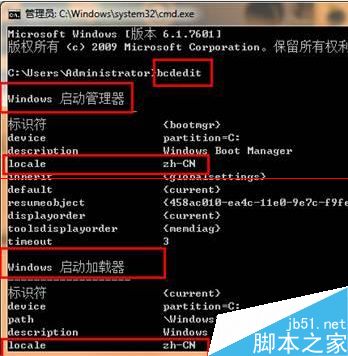
  2. 輸入 bcdedit 檢查「Windows 啟動管理員」與「Windows 啟動載入器」下 locale 值是否為 zh-CN。
  3. 若不符,執行:bcdedit /set {current} locale zh-CN (不含引號)。
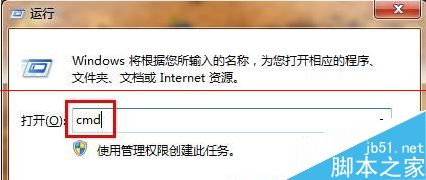
  4. 重新開機驗證動畫恢復正常。
CMD 執行 bcdedit 檢查 locale BCDEDIT 輸出 locale 值檢查

常見於自訂開機動畫後遺留地區設定不匹配。修正 locale 為系統語言代碼即可解決。

Copyright © Windows教程網 All Rights Reserved