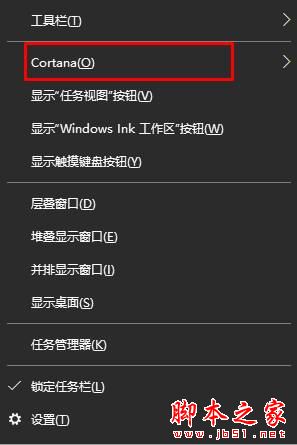
Win10 任務列左側 Cortana 圖示/搜尋框佔空間、易誤觸。右鍵任務列空白處 → Cortana → 隱藏 即可徹底移除,不影響搜尋功能 (Win + S/Win + Q 仍可喚出搜尋)。
同樣右鍵任務列 → Cortana → 顯示 Cortana 圖示 / 顯示搜尋方塊。
註:Win10 2004 (20H1) 版本起 Cortana 改為獨立應用程式,任務列右鍵選單項目變為「搜尋」→「隱藏/顯示搜尋圖示/搜尋方塊」,操作邏輯相同。
Windows 7 更新顯示卡驅動程式完美教學:取得權限刪除舊驅動乾淨安裝新版本
Windows 10 首個非補丁更新 10 月登場:代號 Threshold wave 2、專注優化穩定
Windows 10 自動更新太強勢?三種方法延緩或阻止強制更新(含家庭版方案)
Win10 10565 釋出兩枚更新補丁:KB3106638 累積更新與 KB3105216 IE Flash Player 安全性更新
Windows 8 系統變慢卡頓?五大清理優化步驟恢復流暢
Win8 安裝驅動提示「第三方 INF 不包含數位簽章」:進階啟動停用驅動程式強制簽章
Win8實現IE10收藏夾雲同步:微軟賬戶登錄一鍵搞定
Win10 善用事件檢視器 排查系統問題找出錯誤根因