Windows XP Windows 7 Windows 2003 Windows Vista Windows 綜合教學 Linux 系統教學
Windows 10 Windows 8 Windows 2008 Windows NT Windows Server 電腦軟體教學
您现在的位置: Windows教程網 >> Windows教程 >  >> Windows 綜合教學 >> 關於 Windows

Windows 7 更新顯示卡驅動程式完美教學:取得權限刪除舊驅動乾淨安裝新版本

編輯:關於 Windows

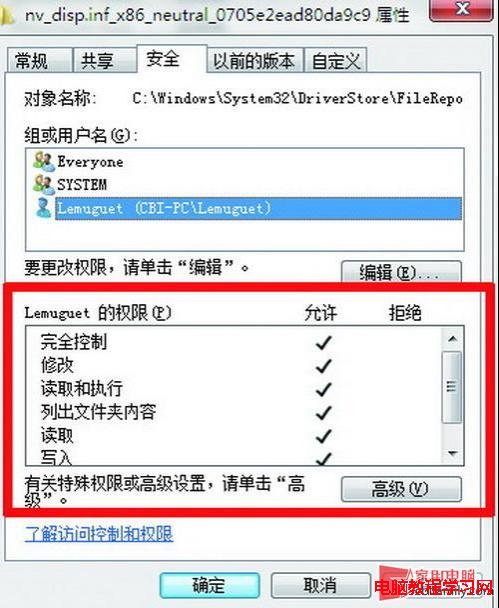
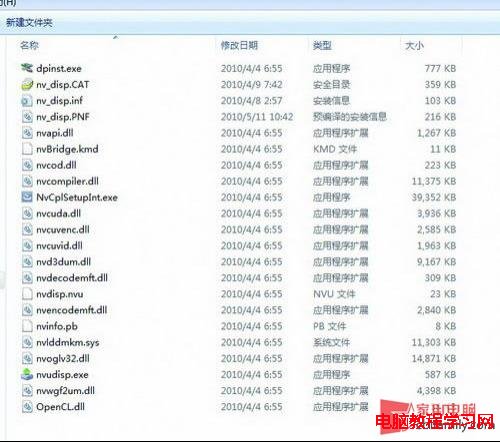
直接覆蓋安裝新顯示卡驅動可能遺留舊檔案影響效能。完美流程:取得 DriverStore\FileRepository\nv_disp.inf_* 資料夾完全控制權限 → 刪除內部檔案 → 解除安裝現有驅動 → 刪除系統資料夾殘留檔案(Windows\System32\NV*、Windows\System32\Drivers\NV*、Program Files\NVIDIA Corporation)→ 重開機安裝新驅動。A 卡同理(ATI* 開頭檔案)。
關鍵步驟

  1. 取得資料夾權限:右鍵資料夾 → 安全性 → 進階 → 新增目前使用者完全控制權限。
  2. 刪除 DriverStore 舊驅動:解除安裝驅動後(勿重開機),刪除對應資料夾所有檔案。
  3. 清理系統殘留檔案:依檔案建立日期與發行者(NVIDIA/ATI)辨識刪除 System32、Drivers、Program Files 下相關檔案。
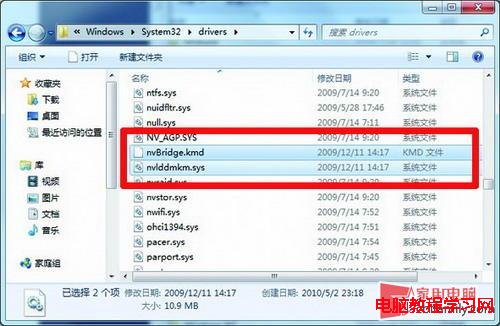
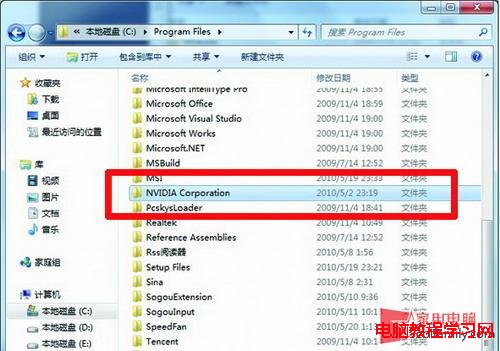
  4. 重開機乾淨安裝新驅動:非覆蓋,效能最佳化。

風險提醒:刪除系統檔案極度謹慎,務必對照建立日期與發行者,誤刪可能導致系統無法開機。RAID/SATA 晶片組驅動同樣為 NVIDIA 發布,勿誤刪。

Copyright © Windows教程網 All Rights Reserved