不小心啟用「高對比度」主題導致介面變復古難看,透過個人化立即換回一般主題:
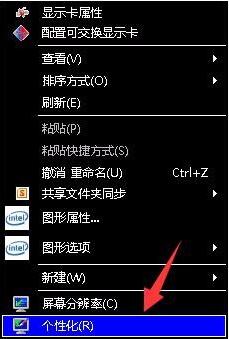
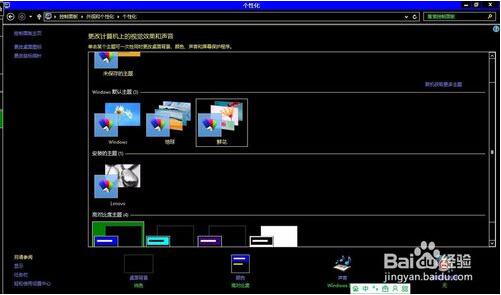
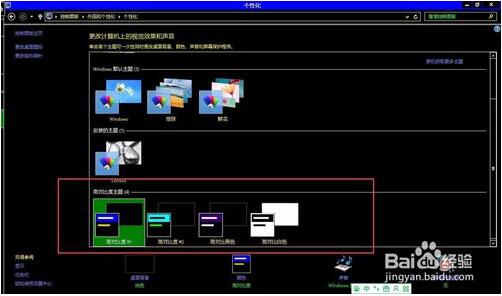
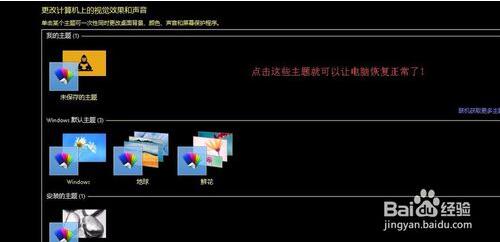
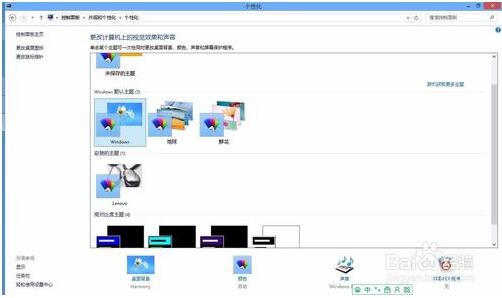
遇到此狀況別慌,一鍵換主題即可復原。
Windows 8 各版本介紹:DP/CP/RP 測試版與正式版四大零售版本差異
Win7 純淨版雙擊無法開啟 TXT 文字檔?重新關聯記事本程式修復
Windows 8 RP 內建 Flash 導致顯卡驅動停止回應/綠屏/花屏?暫時緩解方案
Windows 7 磁碟寫入保護無法複製檔案?登錄表關閉 WriteProtect / 磁碟原則調整效能模式
Win10 發布一個月:全球市場份額達 5.33%,遠超 Win8 成第五大桌面系統
Win10 無法玩《英雄聯盟》?三大解決方案:TGP 登入、修復工具、替換無 TP 主程式
十大 Win10 隱藏功能詳解:非作用中視窗滾動、多螢幕縮放、儲存感知等
無法升級 Win10?常見錯誤代碼與解決方案總整理(虛擬機、KB2267602、帳號、Softwaredistribution)