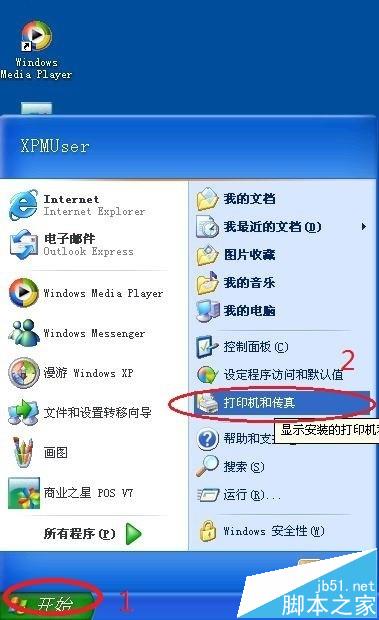
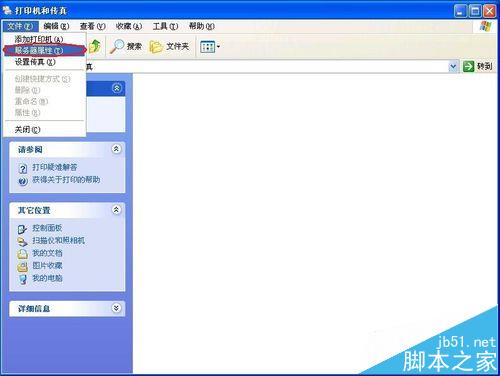
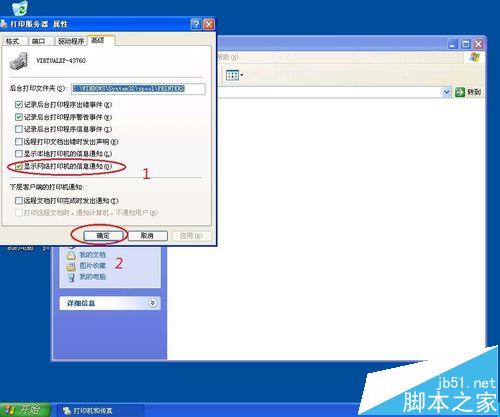
辦公室共用印表機時,他人列印會彈出氣泡通知顯示列印資訊,極易干擾。透過印表機伺服器屬性即可關閉此提醒。
設定後他人列印不再彈出氣泡,適合強迫症用戶。
Win7 提示「此 Windows 副本不是正版 7601」四大原因與對應解決方案
Win7 淘寶購物提示 Aliedit.dll 遺失?三步註冊修復安全外掛
Win10 無法玩《英雄聯盟》?三大解法:TGP 登入、官方修復工具、替換無 TP 保護主程式
Win10 升級導致部分電腦無法開機:黑畫面、提示「缺少作業系統」、硬碟顯示空白,微軟拒絕說明受影響規模
如何安裝 Windows 8 系統:圖文安裝教學完整流程
Win10 RedStone 2 Build 14936 快速通道開始推送
Win10 快速存取釘選資料夾:一鍵固定常用深層目錄到快速存取與檔案選單
Windows 指令模式設定靜態 IP 與 DNS 完整教學:netsh 指令詳解