Windows XP Windows 7 Windows 2003 Windows Vista Windows 綜合教學 Linux 系統教學
Windows 10 Windows 8 Windows 2008 Windows NT Windows Server 電腦軟體教學
您现在的位置: Windows教程網 >> Windows教程 >  >> Windows 綜合教學 >> 關於 Windows

Windows 7 旗艦版 Winmgmt.exe 錯誤彈窗狂跳?WMI 儲存庫損壞重建教學

編輯:關於 Windows

開機後每 30 秒彈出 Winmgmt.exe has generated errors and will be closed by Windows... 錯誤,主因是 WMI (Windows Management Instrumentation) 儲存庫損壞:%SystemRoot%\System32\Wbem\Repository 目錄下檔案異常。停止 WMI 服務、刪除儲存庫、重啟服務自動重建即可修復。

修復步驟

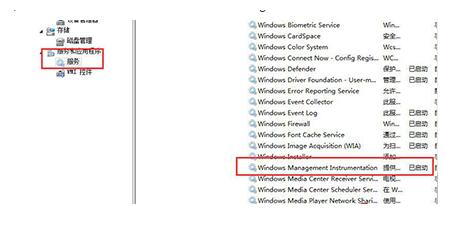
  1. 右鍵「電腦」 → 「管理」 → 「服務與應用程式」 → 「服務」。
  2. 找到 「Windows Management Instrumentation」 → 右鍵「停止」。
  1. 開啟檔案總管,前往 C:\Windows\System32\Wbem\Repository,**刪除該資料夾內所有檔案/子資料夾** (資料夾本身保留)。
  1. 回到服務管理介面,右鍵 「Windows Management Instrumentation」 → 「啟動」。
  1. 服務啟動時會根據註冊表 HKEY_LOCAL_MACHINE\SOFTWARE\Microsoft\WBEM\CIMOM\Autorecover MOFs 定義的 MOF 檔案自動重建儲存庫。錯誤彈窗即刻停止。
補充說明

  • 此法適用 Win7/Win8/Win10/Server 系列。
  • 若錯誤持續,嘗試在安全模式下執行上述步驟,或執行 winmgmt /resetrepository (需管理員 CMD) 嘗試指令修復。

  • WMI 儲存庫損壞常因非正常關機、磁碟錯誤、第三方管理軟體衝突引起。
Copyright © Windows教程網 All Rights Reserved