Firefox 內建 Flash 保護模式 (Protected Mode) 與部分網頁/系統環境不相容,導致「Adobe Flash 已崩潰」頻繁彈出。透過 about:config 關閉 Flash 保護模式即可解決。
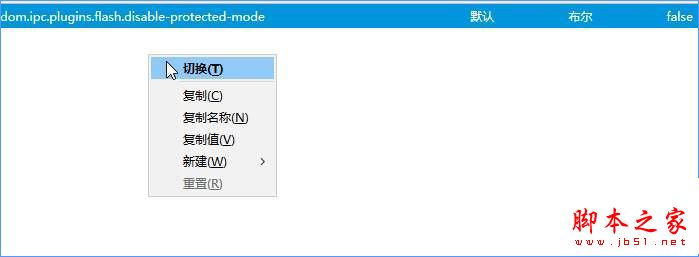
about:config?filter=dom.ipc.plugins.flash.disable-protected-mode 按 Enter。dom.ipc.plugins.flash.disable-protected-mode,預設值 false。右鍵 → 「切換」 將值改為 true。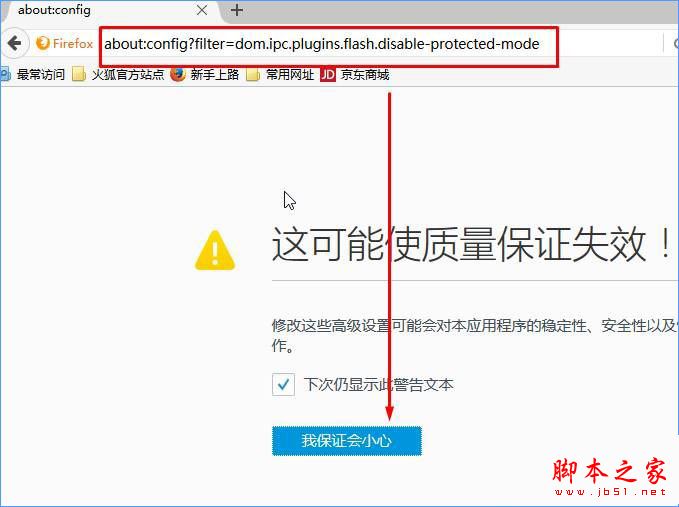
Windows 7 工作管理員無法結束程序?命令列 tskill 強制終結進程教學
Windows 7 關閉休眠功能釋放 C 槽空間:CMD 指令一鍵關閉休眠
Win10 10074 推送 OCR 簡體中文語言包更新:原生支援中文光學字元辨識
Win10 安裝 Paint 3D 後經典「畫圖」消失?註冊表加入 DisableModernPaintBootstrap=1 同時啟用雙版本
Windows 8 內建系統還原/重設電腦完整實測:取代 Ghost 的新選擇?
Win10 清理愛奇藝視訊快取檔案:結束 QyKernel.exe 進程後刪除快取資料夾釋放空間