Windows Server 2003 預設遠端桌面為多用戶模式(建立新 Session),若需像 XP 一樣連線到實體主控台 (Session 0) 查看本機當前桌面,需在啟動參數加入特定開關:
mstsc.exe /consolemstsc.exe /admin/console 或 /admin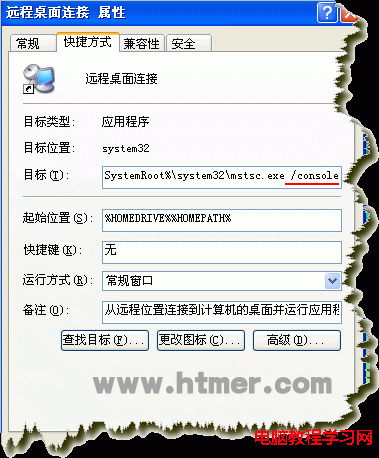
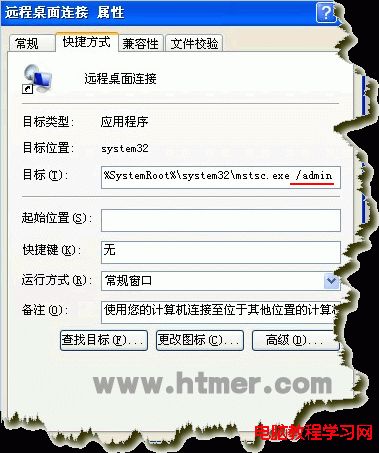
應用場景:遠端協助需查看使用者當前操作畫面、特定硬體授權綁定實體 Session 0 的軟體遠端操作。
Windows 7 設定網卡連線速度與雙工模式,釋放寬頻完整效能
Win10 Mobile 準正式版 10586.11 影片上手體驗:Lumia 635 實測 12 分鐘全功能展示
Windows 7 手動檢查與設定自動更新,確保系統安全無虞
Win10 更改系统字体大小让阅读更舒适:个性化 → 显示 → 仅更改文本大小 → 自定义标题栏/菜单/消息框/图标/工具提示字号 (6-24pt) 与加粗
使用盜版 Win10 體驗如何?桌面水印提示未授權、無完整安全更新、微軟推轉正優惠
Win8/8.1 停用 Modern 鎖定畫面 (鎖屏壁紙) 直接進入登入介面:群組原則設定
[圖輯] Win10 Build 10041 系統體驗:透明開始選單、任務檢視、小娜、UI 圓潤化 20 張高清截圖賞析