Windows 8 內建的「微軟拼音簡捷」輸入法若不習慣,欲移除時發現「移除」按鈕呈灰色無法點擊?關鍵在於必須先安裝支援 Metro 風格(現代應用)的第三方輸入法(如新版 QQ 拼音、微軟注音等),才能啟用移除功能。
前置條件
- Windows 8 系統
- 已安裝支援 Metro 的第三方輸入法
操作步驟
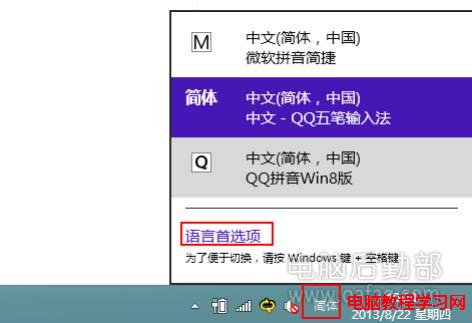
- 點擊工作列右下角輸入法圖示 → 選擇「語言偏好設定」。
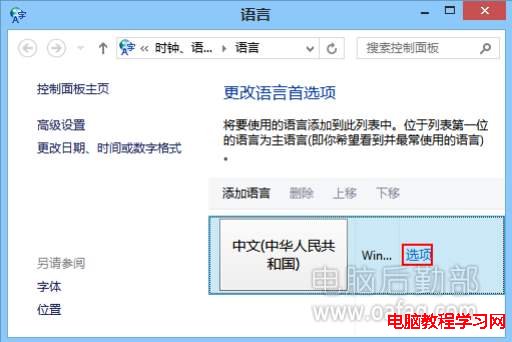
- 在「語言」視窗中,點擊當前語言(中文(繁體/簡體))後方的「選項」。
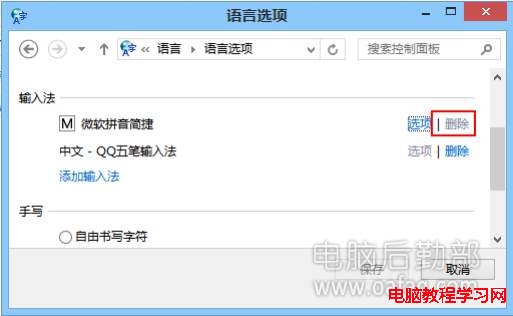
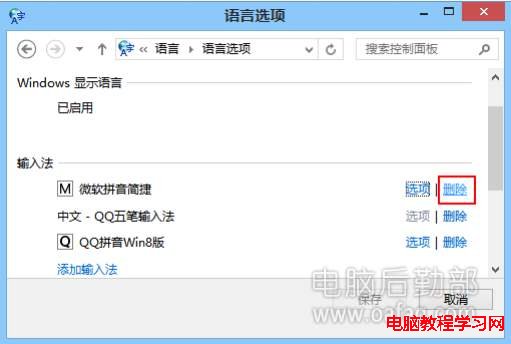
- 進入「語言選項」視窗,此時「微軟拼音簡捷」後方的「移除」按鈕應變為可點擊的藍色。
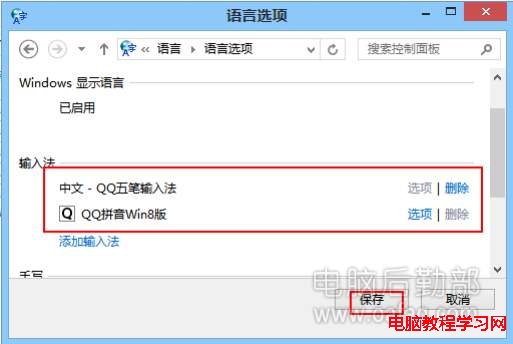
- 點擊「移除」即可刪除該輸入法,最後按「儲存」完成。
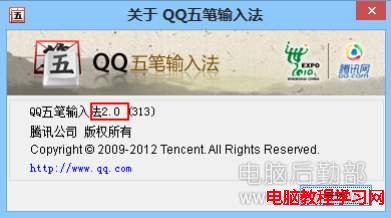
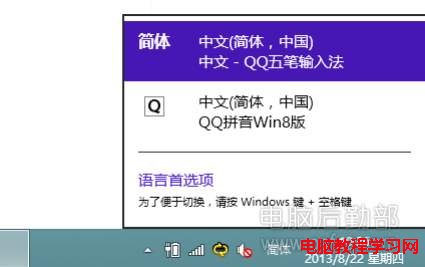
補充:若安裝的第三方輸入法不支援 Metro(如舊版 QQ 五筆),則無法移除微軟拼音,且該第三方輸入法本身也無法被移除。