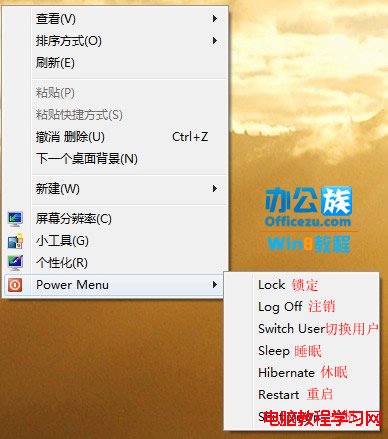
Windows 8 開始畫面缺少傳統關機/登出按鈕,透過匯入登錄檔可在桌面右鍵選單加入「電源選單」,包含鎖定、登出、切換使用者、睡眠、休眠、重新開機、關機等功能。
透過登錄檔在 HKEY_CLASSES_ROOT\DesktopBackground\Shell 建立「Power Menu」子選單,並定義各指令對應的命令列指令 (如 shutdown -s -f -t 00 關機)。
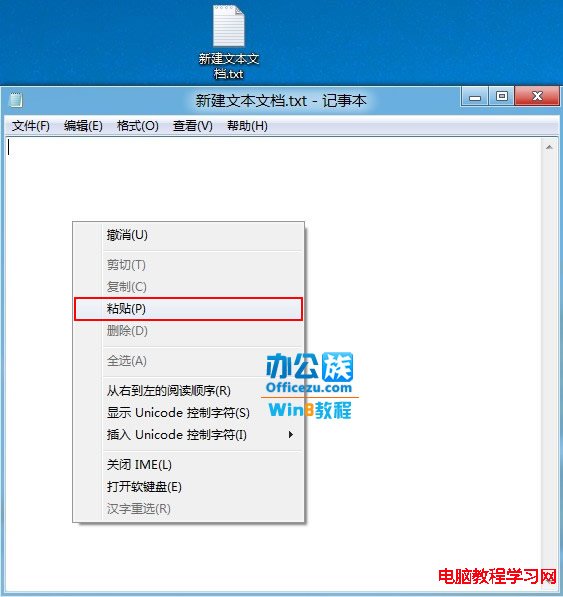
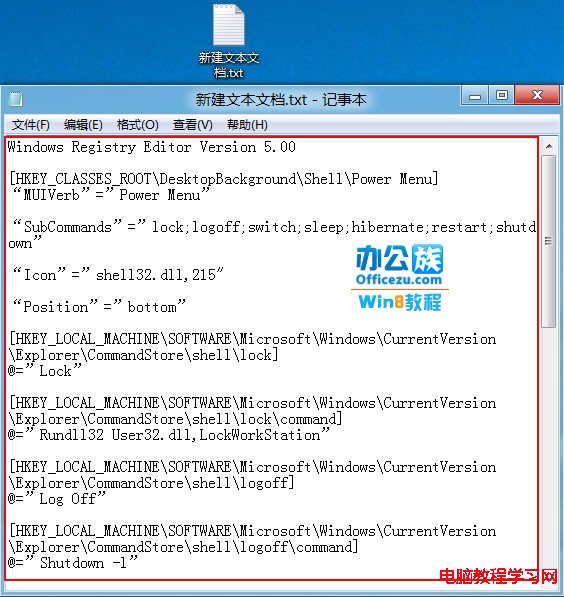
1、新建文字文件,貼上以下登錄檔內容:
Windows Registry Editor Version 5.00
[HKEY_CLASSES_ROOT\DesktopBackground\Shell\Power Menu]
"MUIVerb"="Power Menu"
"SubCommands"="lock;logoff;switch;sleep;hibernate;restart;shutdown"
"Icon"="shell32.dll,215"
"Position"="bottom"
[HKEY_LOCAL_MACHINE\SOFTWARE\Microsoft\Windows\CurrentVersion\Explorer\CommandStore\shell\lock]
@="Lock"
[HKEY_LOCAL_MACHINE\SOFTWARE\Microsoft\Windows\CurrentVersion\Explorer\CommandStore\shell\lock\command]
@="Rundll32 User32.dll,LockWorkStation"
[HKEY_LOCAL_MACHINE\SOFTWARE\Microsoft\Windows\CurrentVersion\Explorer\CommandStore\shell\logoff]
@="Log Off"
[HKEY_LOCAL_MACHINE\SOFTWARE\Microsoft\Windows\CurrentVersion\Explorer\CommandStore\shell\logoff\command]
@="Shutdown -l"
[HKEY_LOCAL_MACHINE\SOFTWARE\Microsoft\Windows\CurrentVersion\Explorer\CommandStore\shell\switch]
@="Switch User"
[HKEY_LOCAL_MACHINE\SOFTWARE\Microsoft\Windows\CurrentVersion\Explorer\CommandStore\shell\switch\command]
@="tsdiscon.exe"
[HKEY_LOCAL_MACHINE\SOFTWARE\Microsoft\Windows\CurrentVersion\Explorer\CommandStore\shell\sleep]
@="Sleep"
[HKEY_LOCAL_MACHINE\SOFTWARE\Microsoft\Windows\CurrentVersion\Explorer\CommandStore\shell\sleep\command]
@="rundll32.exe powrprof.dll,SetSuspendState Sleep"
[HKEY_LOCAL_MACHINE\SOFTWARE\Microsoft\Windows\CurrentVersion\Explorer\CommandStore\shell\hibernate]
@="Hibernate"
[HKEY_LOCAL_MACHINE\SOFTWARE\Microsoft\Windows\CurrentVersion\Explorer\CommandStore\shell\hibernate\command]
@="Shutdown -h"
[HKEY_LOCAL_MACHINE\SOFTWARE\Microsoft\Windows\CurrentVersion\Explorer\CommandStore\shell\restart]
@="Restart"
[HKEY_LOCAL_MACHINE\SOFTWARE\Microsoft\Windows\CurrentVersion\Explorer\CommandStore\shell\restart\command]
@="Shutdown -r -f -t 00"
[HKEY_LOCAL_MACHINE\SOFTWARE\Microsoft\Windows\CurrentVersion\Explorer\CommandStore\shell\shutdown]
@="Shut Down"
[HKEY_LOCAL_MACHINE\SOFTWARE\Microsoft\Windows\CurrentVersion\Explorer\CommandStore\shell\shutdown\command]
@="Shutdown -s -f -t 00"
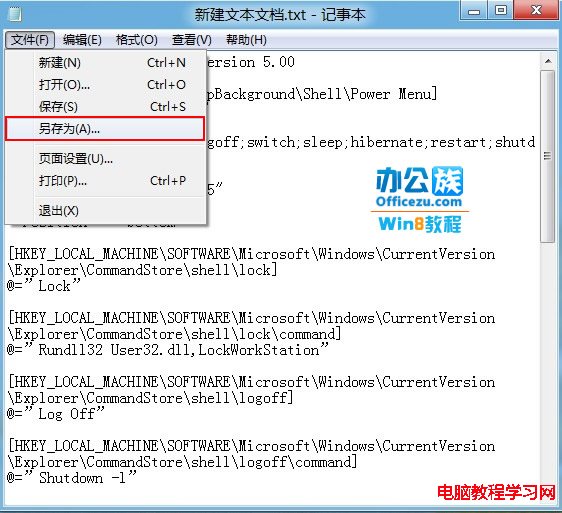
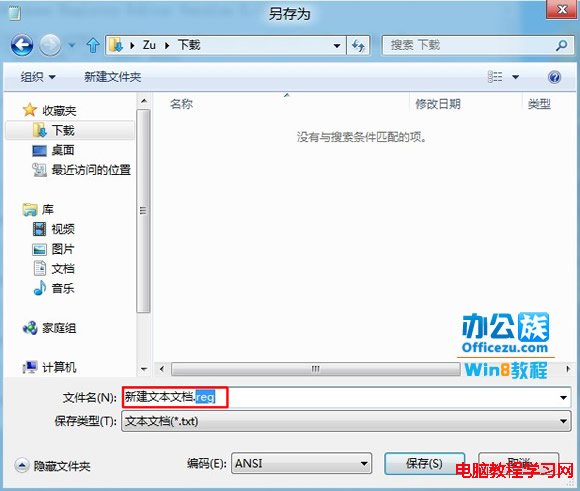
2、另存為 PowerMenu.reg (編碼 ANSI/UTF-8)。
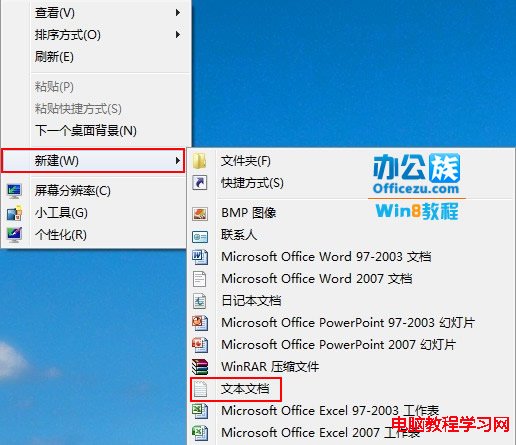

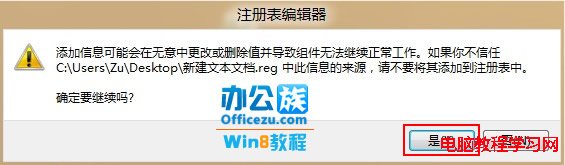
3、雙擊執行 .reg 檔,確認匯入。

4、桌面右鍵即可看到「Power Menu」子選單,包含所有電源操作。

若不想手動製作,文末提供現成 .reg 檔下載 (含新增與移除兩個檔案)。
Win10 Build 10074 「個人化」無法開啟、提示無關聯程式?啟用內建管理員核准模式解決
Windows 10 升級時 EDIUS 6 不相容的解決方案:先解除安裝再裝支援 Win10 的 EDIUS 7.5
Win10 週年更新 14367 釋出:官方一鍵重置工具首度內建、支援保留檔案/全盤清除、新增 23 國手寫語言
Win10 專業版運行變慢卡頓?10 招優化加速:碎片整理、啟動項、服務、驅動、SSD、記憶體全方位提速
Windows 8 調整標題列/選單/訊息框字體大小與粗體完整設定