安裝 Windows 8 Consumer Preview 組成雙系統後,若不習慣可移除 Windows 8 保留原有 Windows 7。透過 msconfig 設定預設開機項目並刪除 Windows 8 開機項目,最後格式化 Windows 8 分區即可。
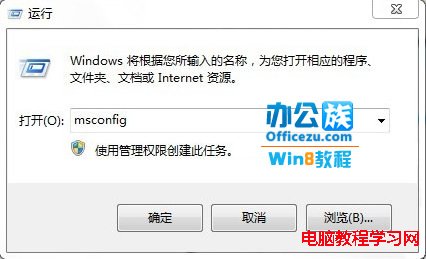
1、進入 Windows 8,按 Win+R 輸入 msconfig 開啟系統設定。

2、開機分頁 → 選擇 Windows 7 設為預設 → 選取 Windows 8 Consumer Preview → 刪除。

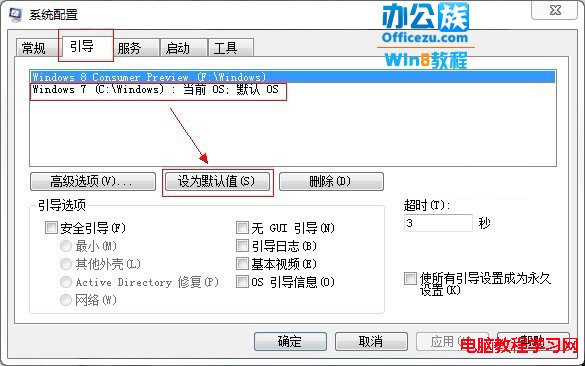

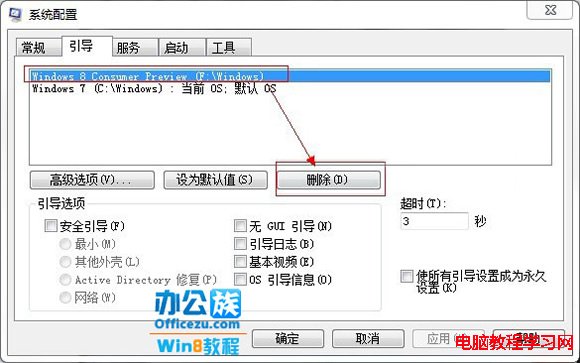
3、最後在「電腦」中右鍵 Windows 8 安裝分區 →「格式化」 (注意先備份重要資料)。
Win10 TH2 (1511) 更新後藍屏循環?SFC/DISM/SFCFix 三階修復法
Win10 Build 10108 釋出:開關控件變化、右鍵選單改版、內建 3D Builder、導覽應用更新
Windows 8.1 將公用網路改為私人網路:啟用「尋找裝置與內容」開關
Win8 執行 explorer.exe 報錯 0xc0000018?刪除登錄表 Image File Execution Options 修復
Windows 8.1 刪除休眠檔案 (hiberfil.sys) 釋放 C 碟空間:powercfg -h off 與群組原則雙法