Windows XP Windows 7 Windows 2003 Windows Vista Windows 綜合教學 Linux 系統教學
Windows 10 Windows 8 Windows 2008 Windows NT Windows Server 電腦軟體教學
您现在的位置: Windows教程網 >> Windows教程 >  >> Windows 綜合教學 >> 關於 Windows

Win8 執行 explorer.exe 報錯 0xc0000018?刪除登錄表 Image File Execution Options 修復

編輯:關於 Windows

Windows 8 執行 explorer.exe 提示錯誤代碼 0xc0000018,經分析是惡意軟體 DB03.EXE 在登錄表 Image File Execution Options 下建立了 Explorer.exe 偵錯項導致。

修復步驟 (建議先備份登錄表)

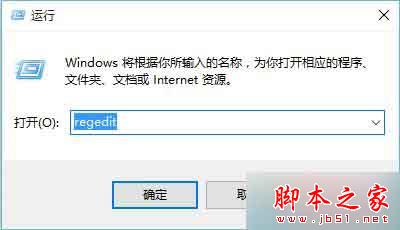
  1. Win + R → regedit 開啟登錄表編輯器。
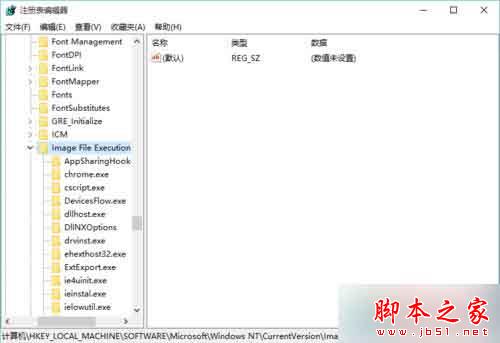
  2. 定位並刪除以下機碼:
    HKEY_LOCAL_MACHINE\SOFTWARE\Microsoft\Windows NT\CurrentVersion\Image File Execution Options\Explorer.exe
  3. 重新開機,explorer.exe 應可正常啟動。

此機碼常被惡意程式利用進行映像劫持,刪除後即可恢復正常啟動邏輯。

Copyright © Windows教程網 All Rights Reserved