Windows XP Windows 7 Windows 2003 Windows Vista Windows 綜合教學 Linux 系統教學
Windows 10 Windows 8 Windows 2008 Windows NT Windows Server 電腦軟體教學
您现在的位置: Windows教程網 >> Windows教程 >  >> Windows 綜合教學 >> 關於 Windows

升級 Windows 10 後可降級嗎?微軟給予 30 天寬限期可還原舊系統

編輯:關於 Windows

Windows 10 將於 7 月 29 日正式釋出,Win7/Win8.1 用戶可免費升級。若升級後不滿意,微軟確認提供 30 天寬限期可降級回原系統。
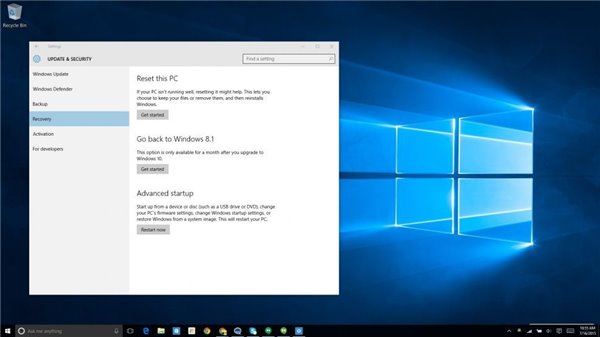
降級選項示意

降級機制

  • Insider 計畫預覽版已提供「回滾」功能。
  • Build 10240 明確宣告用戶可在一個月內選擇「降級」。
  • 操作路徑:開始→設定→更新與安全性→復原→「回復上一版本 Windows」。
  • 選擇「重設這台電腦」則會乾淨重裝 Windows 10。

超過 30 天後仍可透過廠商提供的系統復原手段(如復原磁碟、隱藏分區)還原舊版本。

Windows 10 包含 Cortana、全新開始選單、Edge 瀏覽器、虛擬桌面、混合式裝置優化等新功能。Win7/8/8.1 免費升級並享產品生命週期內免費更新。其他用戶家庭版 $119、專業版 $199。微軟分批推送,Insider 會員優先收到。

此前傳聞「免費更新僅 2-4 年」已被證實錯誤,微軟文件確認提供免費 10 年更新支援。

Copyright © Windows教程網 All Rights Reserved