Windows XP Windows 7 Windows 2003 Windows Vista Windows 綜合教學 Linux 系統教學
Windows 10 Windows 8 Windows 2008 Windows NT Windows Server 電腦軟體教學
您现在的位置: Windows教程網 >> Windows教程 >  >> Windows 綜合教學 >> 關於 Windows

Windows 7 設定動態桌面壁紙:自動輪播資料夾內圖片

編輯:關於 Windows

厭倦靜態桌面?Windows 7 內建幻燈片功能,指定資料夾與切換間隔,即可讓桌面自動輪播喜愛的圖片,心情跟著換裝。

操作步驟

  1. 將喜歡的壁紙集中放入一個資料夾(如 D:\Wallpapers)。
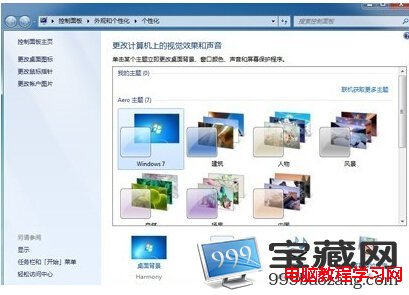
  2. 桌面右鍵 → 「個人化」→ 「桌面背景」。
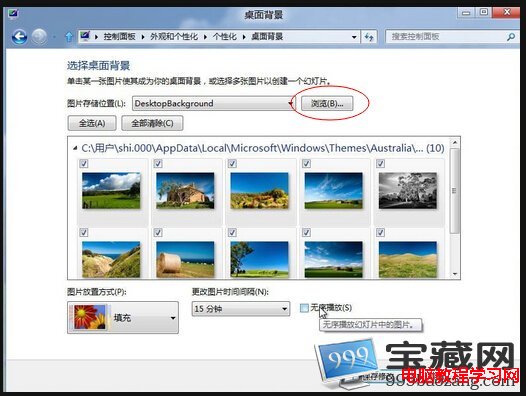
  3. 點擊「瀏覽」選取該資料夾 → 所有圖片會列出並自動勾選。
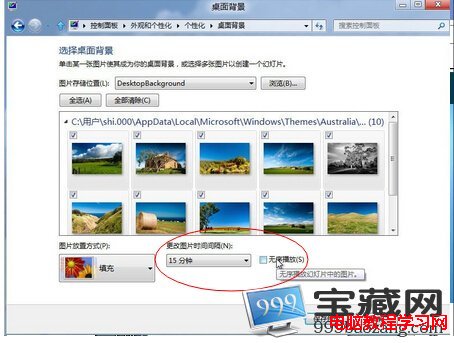
  4. 「圖片位置」選「填滿」→ 「更改圖片的時間間隔」設定輪播頻率(10 秒 ~ 1 天)。
  5. 勾選「隨機播放」→ 「儲存變更」。

注意:動態桌面會消耗少量 CPU 與記憶體,低階電腦建議拉長切換間隔或關閉。

Copyright © Windows教程網 All Rights Reserved