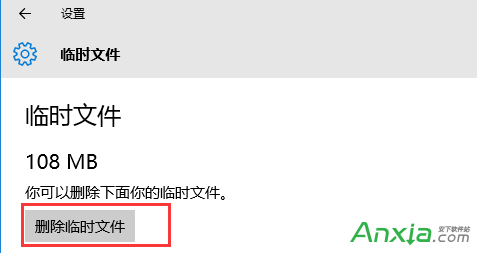
Win10 內建儲存體感知可一鍵掃描並刪除系統暫存檔、瀏覽器快取、更新清理檔等,無需第三方清理軟體。
清理過程會掃描全系統暫存目錄,包含正在使用的瀏覽器快取等可能無法立即刪除,建議關閉相關程式後執行。此功能等同於舊版「磁碟清理」的現代化介面。
Windows 7 視窗拖到螢幕邊緣自動最大化如何關閉?登錄修改法禁用 Aero Snap
Win10 連接 XP 共享印表機完整圖文教學
Windows 10 應用商店更新至 2015.8.3.2 版:修正無法開啟、下載錯誤 0x803F7000/0x803F7003、裝置數量上限誤判等問題
Win8 筆電螢幕閃爍怎麼辦?從重設率、驅動更新到硬體故障判斷完整指南
Win10 預覽版 10166 自製中文 ISO 系統鏡像下載(64 位/32 位)
Win10 自訂鎖定畫面圖片:設定→裝置→鎖定畫面→瀏覽上傳
Win10 Windows Defender 卸载第三方杀毒后无法启动修复:sc start WinDefend 命令一键恢复
Windows 8 鍵盤故障時啟用螢幕鍵盤應急輸入