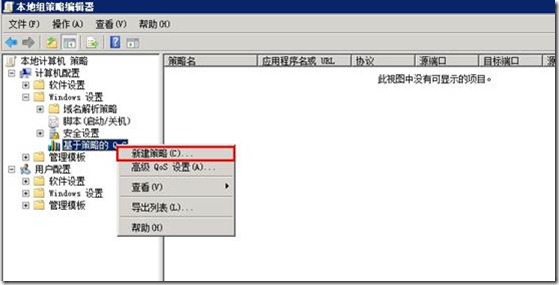
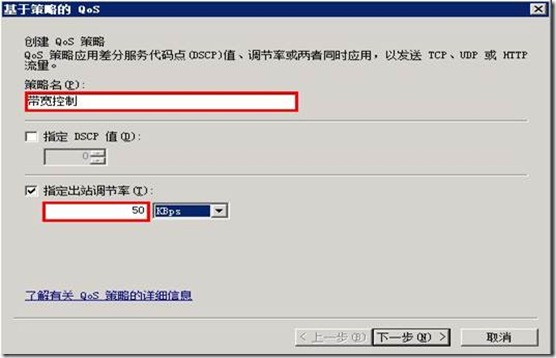
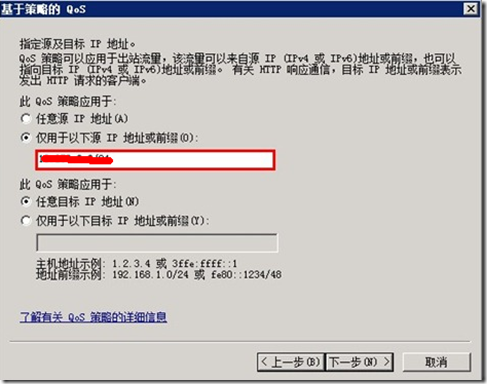
企業營運中,伺服器資料同步偶爾佔滿頻寬影響業務。可善用 Windows 內建 QoS 原則,透過群組原則限制特定同步流量的出站頻寬,保障網路正常運作。
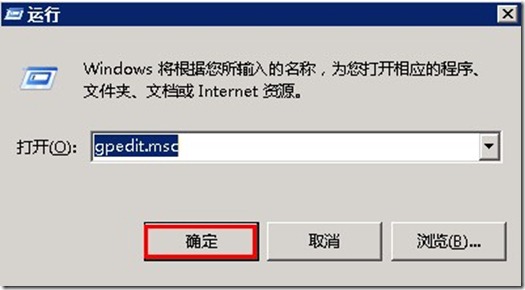
gpedit.msc
應用場景:資料庫同步、備份複寫、大量檔案傳輸等背景任務,避免佔用過多頻寬影響前端業務存取。
Windows 8 乾淨啟動模式完整教學:疑難排解必備技巧
Win10 UWP「電影與電視」預覽版更新:新增永遠全螢幕播放選項
Win10 如何設定指紋登入 (Windows Hello)?完整圖文教學
Win10 中文版商店與 Metro 應用程式顯示英文?將中文設為預設語言解決
Win7/8.1 右下角出現「取得 Windows 10」圖示怎麼辦?完整應對與升級實測
Win10 專業版將資料夾固定到工作列/工具列:兩種方法完整教學
Windows 8.1 內建郵件應用程式附件亂碼無法識別?語言/地區/輸入法設定排查
Win7 啟用/停用縮圖預覽:資料夾選項「一律顯示圖示,不顯示縮圖」設定